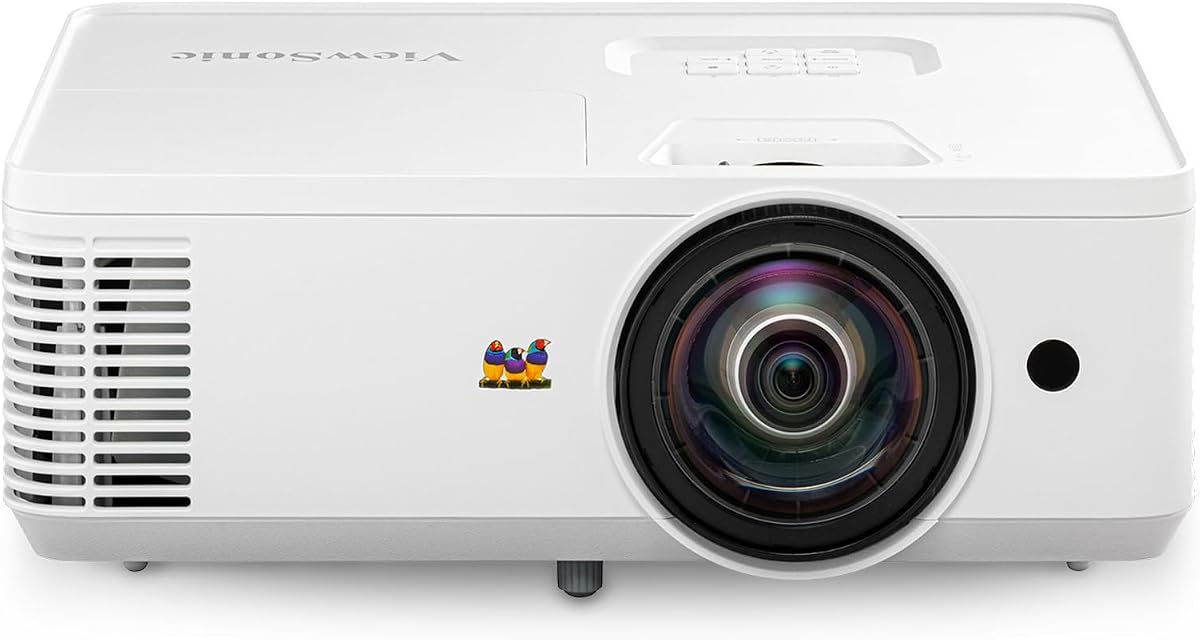
ViewSonic PS502W
4.4Editor score
Short-throw classroom placement
Bright 4,000-lumen output
Images up to 150 inches
A document projector for a classroom must make small text, demonstrations, and teaching materials easy for every student to see. The right unit combines accurate capture, bright projection, flexible positioning, dependable connectivity, and controls that a teacher can operate without disrupting a lesson.
This guide compares ten classroom presentation devices, including USB and wireless document cameras, overhead projectors, and conventional classroom projectors. The evaluation considers resolution, capture area, lighting support, zoom, connection options, compatibility, placement flexibility, recording features, and ease of everyday operation.
Each review explains the strongest reasons to choose a model, along with limitations that may matter in a particular learning environment. The list covers everything from a portable visualizer to a higher-end short-throw projector, and current prices should be checked because promotions and availability change.
4.4Editor score

4.6Editor score

4.4Editor score
As an Amazon Associate we earn from qualifying purchases.
The comparison below shows how these classroom projectors and visualizers differ in capture quality, placement flexibility, illumination, connectivity, and classroom-oriented functions.






The IPEVO V4K is an 8MP USB document camera built for teachers who regularly need to show printed pages, small objects, experiments, or live demonstrations. Its 4.5 rating reflects a strong balance of image detail, responsive focusing, and straightforward compatibility with Mac, Windows, and Chromebook systems.
We may earn a commission when you buy through this link, at no additional cost to you.
Capture reaches 3264 by 2448 pixels, while live streaming can run at 30 frames per second in full HD or 15 frames per second at the maximum resolution. A Sony CMOS sensor, fast focusing system, and built-in noise reduction help maintain clarity and color reproduction, including when the demonstration area is not brightly lit.
The maximum shooting area of 13.46 by 10.04 inches is suitable for many worksheets, textbook pages, and small teaching objects. Its multi-jointed stand provides more positional freedom than a basic fixed-arm visualizer, although the loose-joint adjustment mentioned in the product information may require occasional tightening during heavy daily use.
This is a strong choice for classrooms that already have a projector, interactive display, or computer and need a dedicated camera to present documents. It is less suitable for a room needing an all-in-one projection solution, and the lack of wireless operation means the USB cable must reach the instructor station. For teachers seeking fine live-image detail and dependable plug-and-play use, the V4K remains a strong recommendation.
As a document camera rather than a conventional projector, it is particularly useful for remote teaching, live demonstrations, and distance learning. Its broad platform support and high-resolution sensor make it a versatile teaching tool for schools, tutors, and training environments.
The 8MP sensor provides enough detail for small print and close demonstrations, while the available streaming modes balance detail with smooth motion. Automatic focusing is especially useful when a teacher switches between materials or moves a physical object.
The articulated stand allows the camera to move between overhead, angled, and side views. Teachers can therefore capture a full page, zoom toward a detail, or reposition for a hands-on science demonstration without changing camera systems.
We may earn a commission when you buy through this link, at no additional cost to you.
The Apollo Horizon 2 is a traditional overhead projector designed around a 10-inch by 10-inch transparent stage. It suits teachers who still rely on transparencies, handwritten demonstrations, physical maps, or objects that are easier to show from directly above.
We may earn a commission when you buy through this link, at no additional cost to you.
Its 2,000-lumen output and LCD display system provide a recognizable alternative to camera-based visualizers. Unlike a document camera, it does not need to be connected to a computer to show material placed on the glass. VGA and USB connections expand its usefulness for instructors who also need to display digital media.
The open-head format is the defining advantage. A teacher can point, write, trace, or manipulate an object while the entire class sees it from the same overhead perspective. The 10-inch stage also provides a larger working area than many compact digital visualizers, which is helpful for older overhead transparencies and broad teaching aids.
The trade-offs are practical rather than hidden. A traditional overhead projector occupies more space than a compact visualizer and may feel less flexible for modern camera-based demonstrations. The available product information is also limited, so prospective buyers should confirm their preferred source connections, display requirements, and lamp expectations before purchasing.
For schools with existing transparency-based teaching practices or teachers who value an unobstructed physical stage, the Horizon 2 serves a distinct purpose. It is less appealing for a new digital classroom centered on wireless cameras, compact storage, and computer-mediated annotation, but it remains a practical overhead presentation option.
The transparent stage makes it easy to demonstrate handwriting, tracing, layered transparencies, and three-dimensional objects from above. Students see the action directly rather than through a digital image with inverted orientation.
VGA and USB connections allow the unit to handle appropriate computer sources in addition to its native optical stage. That versatility helps it bridge older teaching materials and digitally prepared lesson content.
We may earn a commission when you buy through this link, at no additional cost to you.
The IPEVO VZ-X is the most versatile document camera in this guide, combining an 8MP sensor with Wi-Fi, HDMI, and USB operation. Its 4.6 rating is especially strong given the range of devices it supports, including computers, iOS and Android devices, Apple TV, projectors, televisions, and monitors.
We may earn a commission when you buy through this link, at no additional cost to you.
In Wi-Fi and HDMI modes, it captures high-definition images at 1920 by 1080, while USB mode can reach 3264 by 2448 pixels. Video recording supports 1920 by 1080 at 30 frames per second, and the Ambarella processor supports fast focusing, noise reduction, and color reproduction.
Built-in LED lighting makes it easier to show small objects and text in changing classroom conditions. The viewing area reaches 11.14 by 19.72 inches in a 16:9 orientation, while the stated battery life of 9 to 12 hours and wireless range of up to 33 feet give teachers considerable freedom to move around the room.
Its main inconvenience is that three operating modes create more configuration choices than a single-purpose USB camera. Users still need appropriate software, cables, or wireless setup, and a school with many device types may need time to establish a consistent connection procedure. The battery and built-in lighting also mean the unit is more substantial than the simplest visualizers.
The VZ-X is an excellent recommendation for teachers who alternate between in-person instruction, remote sessions, tablets, computers, and shared displays. Body-mounted controls permit immediate camera adjustments without returning to a computer, while wireless operation reduces cable clutter. It is the most adaptable choice for a modern, mixed-device classroom.
Wi-Fi, HDMI, and USB support allow the same visualizer to move between a computer lesson, a wireless presentation, and a direct display connection. This makes it easier to accommodate changing lesson formats and bring the camera to rooms where cable access is limited.
Buttons on the camera body allow teachers to adjust the video feed without navigating computer software. During demonstrations, that convenience reduces interruptions and keeps attention on the object being shown.
We may earn a commission when you buy through this link, at no additional cost to you.
The THUSTAR A3-Size is an affordable document camera and webcam that gives teachers a generous capture area, integrated lighting, and broad operating-system support. Its 4.4 rating indicates a well-rounded option for live demonstrations, distance education, and ordinary classroom computer use.
We may earn a commission when you buy through this link, at no additional cost to you.
The 8MP sensor produces images up to 2448 pixels, and the camera supports live video at 30 frames per second. A press-to-focus control helps prevent a moving object from causing the image to drift out of focus, while manual left-right, up-down, and inverted image adjustments give teachers control over presentation orientation.
A 14-bead ring lamp offers three brightness levels, which is useful for avoiding both dark captures and unwanted glare. The articulated support handles 2D and 3D objects, and the stated maximum area of 16.5 by 11.6 inches accommodates A3 paper. Its folding construction also makes the unit easier to carry and store between rooms.
The main limitation is its 3.94-inch minimum focusing distance, which is less suitable for extreme close-up work. It also relies on USB rather than offering built-in wireless connectivity, and teachers must plan cable routing to the classroom computer or display. A potential advantage is that the included microphones can support voice pickup during remote lessons and demonstrations.
This model is a strong choice for schools seeking a capable visualizer without moving into higher-end wireless equipment. Its plug-and-play support for Windows PCs, Macs, Chromebooks, and major video-conferencing platforms makes it approachable for teachers with varied technical experience. It is especially compelling for value-conscious buyers who prioritize lighting, capture area, and included microphones.
The adjustable ring lamp is one of the most useful classroom features because documents can look washed out in bright rooms or disappear in dim rooms. Three brightness levels let a teacher tune the camera to the surrounding conditions.
Manual image inversion and directional adjustment are valuable when a camera is mounted at an unusual angle. Teachers can maintain a natural viewing direction without rotating the entire unit or using more complicated software adjustments.
We may earn a commission when you buy through this link, at no additional cost to you.
The INSWAN INS-2 is a high-resolution visualizer designed for educators who want crisp images, broad capture capability, and dedicated teaching software. Its 4.4 rating reflects a capable package centered on a 13MP Sony sensor, 4K output, A3 coverage, and several classroom-oriented utilities.
We may earn a commission when you buy through this link, at no additional cost to you.
It records 3840 by 2160 images at 30 frames per second, giving teachers considerable detail for artwork, large documents, two-page spreads, and fine demonstrations. A flexible multi-joint arm supports angle changes, while dual-mode autofocus, brightness controls, macro focusing as close as 3.9 inches, an anti-glare sheet, a built-in LED, and a microphone round out the imaging package.
The included Documate software expands the camera beyond basic image presentation. Its tools include zoom, annotation, video recording, scanning, whiteboard functions, and optical character recognition. Those features can make lesson preparation more efficient and allow teachers to transform a live camera image into a reusable document or annotated teaching resource.
Some setup effort is needed because the enhanced functions depend on the software, and the unit is more substantial than a simple foldable webcam. Compatibility depends on the required operating system version: Windows 7 through 11, Mac 13.5 or later, compatible USB-C iPads, and Chromebook 38.0 or later are listed.
The INS-2 is an excellent fit for professional educators, art instructors, and schools that value presentation quality and integrated teaching tools. It is especially compelling when the visualizer will be used for both live instruction and the creation of recorded or annotated content. Teachers who need wireless presentation may prefer a camera with integrated Wi-Fi.
Documate turns the visualizer into a broader teaching platform through annotation, scanning, recording, whiteboard tools, zoom, and OCR. These functions are valuable when a lesson must be presented live and preserved for later review.
The 4K sensor and A3 capture area are especially useful for artwork, diagrams, large-format pages, and two-page spreads. A close focusing distance further helps when the goal is to show small features on a physical object.
We may earn a commission when you buy through this link, at no additional cost to you.
The Lumens DC166 is a document camera projector distinguished by its 6x optical zoom, 8x digital zoom, one-touch recording controls, and compatibility with interactive whiteboards. Its 3.6 rating is the lowest in the group, so buyers should carefully assess the available features against their teaching setup.
We may earn a commission when you buy through this link, at no additional cost to you.
Optical zoom is the defining advantage for detailed demonstrations. Instead of relying only on digital magnification, the camera can move closer to a document or object while preserving usable image quality. Resolution options include UXGA, SXGA, and XGA, allowing the unit to work with different computer outputs and display requirements.
The camera includes internal memory for 120 JPEG images and an SD card slot that accepts cards up to 32GB. One-touch video recording and playback simplify capturing a lesson or demonstration, while interactive whiteboard compatibility makes the visualizer useful in rooms where teachers already annotate digital content.
The lower rating suggests that some users may have found aspects of performance, operation, or support less satisfying. The supplied information also describes an older visualizer format without a built-in LED, current wireless mode, or modern USB-C emphasis. Buyers may need to verify the included lamp, current computer connections, and software requirements before ordering.
The DC166 makes the most sense for a classroom that values optical zoom, physical recording, removable storage, and interactive whiteboard integration over wireless convenience. It is a specialized tool rather than a general-purpose modern presentation camera. In institutions with established Lumens workflows, those familiar functions may outweigh the drawbacks evident in its lower aggregate rating.
The 6x optical zoom is helpful for showing small print, circuit components, specimens, or fine artwork. Digital magnification can extend the view further, but physical optical zoom is usually preferable when image clarity is the priority.
One-touch recording, internal image storage, and SD card expansion provide a practical record of demonstrations. Interactive whiteboard compatibility adds value in technology-equipped rooms where captured visuals need to become part of an annotated lesson.
We may earn a commission when you buy through this link, at no additional cost to you.
The Epson PowerLite 118 is a conventional 4:3 classroom projector with a 4.9 rating, the second-highest aggregate score in the guide. It is designed for teachers who need a large shared display for prepared lesson content, presentations, video, and visually supported instruction.
We may earn a commission when you buy through this link, at no additional cost to you.
Its 3LCD technology produces vibrant images, while the built-in speaker provides a convenient way to include audio without depending entirely on the classroom sound system. HDMI carries video and audio through one cable, which helps simplify connections to computers and other presentation sources.
The moderator function is especially useful in collaborative classrooms. It can connect up to 50 users simultaneously, allowing a teacher to manage shared devices and control what appears on screen. The projector is also ceiling mountable, making it appropriate for permanent installation rather than portable use alone.
The stated 17,000-hour lamp life supports a long-term classroom role, reducing the frequency of lamp-related maintenance. However, this is a projector rather than a visualizer, so it cannot independently capture a physical page or object. The 4:3 format also reflects traditional classroom content and may require letterboxing or side margins with widescreen material.
The PowerLite 118 is a strong choice for schools seeking a dependable, high-rated display with good color, audio, and collaborative-device management. It can be paired with one of the document cameras in this guide when live paper and object demonstrations are a frequent requirement. For those needs, the VZ-X offers an especially convenient wireless visualizer option.
The long stated lamp life, ceiling-mounting support, and simple HDMI connectivity align with the demands of regular scheduled instruction. A permanent installation can also keep the projector out of the way of desks and student activities.
The moderator function supports up to 50 simultaneous users, which helps teachers control classroom computers during collaborative work. It reduces the need for students to handle complicated source switching at the front of the room.
We may earn a commission when you buy through this link, at no additional cost to you.
The DLP Business Projector is a 3,300-lumen presentation projector rated at 5.0 by customers, making it the highest-rated model in this guide. It is aimed at classrooms, offices, meeting rooms, and training spaces that need clear large-screen display for prepared visual content.
We may earn a commission when you buy through this link, at no additional cost to you.
Its 3,300-lumen output is designed for indoor use where ambient light may reduce the visibility of a darker projection. The DLP system supports natural color presentation and enhanced contrast, helping slides, charts, documents, and instructional graphics remain clean and detailed on a shared screen.
Large-size projection makes the unit suitable for group instruction in which every student needs a view of the same material. A fast startup design reduces preparation time between lessons or meetings, while the straightforward wired connection method avoids the need for more complicated network configuration.
This is a projector, not a document camera, so physical pages and objects require a separate visualizer or overhead system. Its wired-only approach may also be less convenient in a highly mobile classroom than a wireless presentation setup. The supplied information does not specify native resolution, throw ratio, or detailed input selection, so those points should be confirmed against the current listing before installation.
The product is a compelling choice for teachers prioritizing brightness, simple operation, and a large display over wireless flexibility. Its listed rating is excellent, though ratings should be considered alongside the limited published specifications. Schools needing both digital slides and live physical-document capture may want to pair this projector with the V4K or THUSTAR visualizer.
A 3,300-lumen output is well suited to classrooms that often retain daylight or overhead lighting. The higher brightness helps instructional content remain visible when teachers cannot fully darken the room.
Quick startup and a simple wired workflow minimize delays at the beginning of a class or meeting. This is valuable in schools where rooms are shared and the projector must be ready on a tight schedule.
We may earn a commission when you buy through this link, at no additional cost to you.
The Epson PowerLite E20 is a flexible 4:3 LCD projector with a 4.8 rating and a clean white housing. It is suited to schools and training rooms that need a permanent or semi-permanent display for prepared slides, documents, videos, and teacher-led presentations.
We may earn a commission when you buy through this link, at no additional cost to you.
Epson's 3LCD technology is highlighted for vibrant, true-to-life images, which can make charts, photographs, and text easier to distinguish. A five-watt built-in speaker adds basic audio capability, while HDMI transfers both video and sound over a single connection to simplify setup.
The flexible construction supports placement from virtually anywhere, and the projector can be ceiling mounted for a stable classroom arrangement. Its stated 12,000-hour lamp life supports regular use over an extended period, while the white finish is appropriate for many modern learning environments.
The 4:3 format may not fill modern widescreen surfaces efficiently, and the lower lamp-life figure is less impressive than that of the PowerLite 118. Like the other conventional projectors here, it cannot capture a physical document without a visualizer. These are meaningful limitations for instructors whose lessons center on live paper demonstrations.
The E20 is a strong choice for a teacher who values image color, straightforward HDMI connectivity, built-in sound, and flexible installation. Its strong rating supports its suitability for routine classroom projection. A teacher who often shows small objects can add the compact THUSTAR A3-Size for a complete visualizer-and-projector combination.
The 3LCD system is designed to produce vivid, true-to-life presentation imagery. This is helpful for subjects in which color distinctions, diagrams, and photographic material play an important role.
The construction supports multiple placement options, and ceiling mounting is available for rooms with a fixed projection arrangement. The included audio and single-cable HDMI connection keep routine lesson setup manageable.
We may earn a commission when you buy through this link, at no additional cost to you.
The ViewSonic PS502W is a short-throw projector built for classrooms and small meeting rooms where a large image must fit into limited space. Its 4.4 rating reflects a strong package of brightness, flexible placement, color technology, and installation features.
We may earn a commission when you buy through this link, at no additional cost to you.
The projector produces 4,000 ANSI lumens, allowing presentations to remain visible under moderate ambient light. Its WXGA resolution of 1280 by 800 is suitable for common classroom slides and documents, while SuperColor technology supports a wide color gamut for educational graphics, images, and professional visuals.
The 0.5 throw ratio is the major attraction. It can create a 100-inch image from 4.5 feet away and supports screen sizes up to 150 inches, making it useful in narrow rooms where a conventional projector would require more distance. Vertical auto-keystone correction and digital zoom help produce a squared image with less manual adjustment.
The limitation is that WXGA is below full HD and 4K, so extremely fine text or high-resolution media may reveal less detail than on a higher-resolution display. It is also a conventional projector without native document capture. Teachers who need live physical-document presentation should pair it with a suitable visualizer rather than expect the PS502W to capture pages itself.
The PS502W is our premium short-throw recommendation for schools seeking a bright, large image without dedicating a deep classroom to projector placement. It can sit on a table or be ceiling mounted, and dual HDMI inputs simplify source switching. For compact rooms, frequent daylight use, and large-group instruction, its feature set is particularly convincing.
The 0.5 short-throw ratio allows a 100-inch display from 4.5 feet away and up to 150 inches when space permits. Teachers gain a large shared image without pushing the projector deep into the room or allowing it to cast distracting shadows.
The 4,000-ANSI-lumen output is designed to remain clear in moderate ambient light, while SuperColor supports more vivid educational material. Together, they help the image remain understandable during daytime sessions or brightly lit training rooms.
We may earn a commission when you buy through this link, at no additional cost to you.
The right classroom projector depends on what teachers need to display, how the room is arranged, and which devices are already available. Resolution, brightness, capture method, connectivity, and ease of use should be considered together.
A document camera captures physical pages, objects, and demonstrations for a computer or display. A projector creates a large image from a digital source but generally needs a separate camera when live paper and object instruction is important. Schools that regularly handle worksheets, science experiments, artwork, or overhead demonstrations should prioritize a visualizer, while rooms centered on prepared slides may need only a projector.
Document cameras are commonly distinguished by sensor resolution and practical streaming resolution, while projectors need enough native resolution for readable classroom content. The IPEVO VZ-X reaches near-4K detail in USB mode, the INSWAN INS-2 captures at 4K, and the IPEVO V4K supports 3264 by 2448 images. Among projectors, the ViewSonic uses WXGA, so very fine text should be checked before selection.
Room lighting has a major effect on visibility. Projectors with higher lumen output are better suited to classrooms that cannot be darkened, while document cameras benefit from built-in LED lamps that illuminate the page or object. The ViewSonic PS502W offers 4,000 ANSI lumens, the DLP model offers 3,300 lumens, and several visualizers include dedicated lighting controls.
A wide capture area makes it easier to show an entire textbook page, poster, or A3 sheet without repositioning. Optical zoom is especially valuable for small objects because it magnifies without relying entirely on digital processing. The Lumens DC166 stands out with 6x optical zoom, while the INSWAN offers a close focusing distance and an A3-oriented capture area.
The classroom computer ecosystem determines which connection methods matter. USB provides a dependable direct route for Windows, Mac, and Chromebook systems, while Wi-Fi removes cable constraints and can support tablets and mobile devices. HDMI is valuable for direct display connections. The IPEVO VZ-X provides all three approaches, making it the most adaptable unit in this guide.
Throw ratio, image size, and mounting options determine whether a projector fits the available wall and furniture arrangement. Short-throw models are particularly useful in compact classrooms because they create large images from a short distance. The ViewSonic supports images up to 150 inches and a 0.5 throw ratio, while the Epson models are ceiling mountable for fixed installations.
A camera that only transmits an image may be sufficient for basic demonstrations, but annotation and recording tools can extend its usefulness. The INSWAN INS-2 includes Documate with zoom, annotation, scanning, recording, whiteboard tools, and OCR. The Lumens DC166 offers one-touch recording and storage, while the IPEVO VZ-X includes body controls for rapid feed adjustment.
Portable visualizers need a compact design, manageable stand, and simple setup. The THUSTAR folds for transport, and the IPEVO VZ-X includes a battery for extended roaming, though multiple connection modes add configuration complexity. Fixed projectors generally require less daily repositioning, but lamp life, mounting, and cable management become more important for long-term reliability.
Begin by identifying the lesson's source. Connect a document camera to the classroom computer, display, or projector using the appropriate USB, HDMI, or wireless route, then confirm that the operating system recognizes it as a camera. For a projector, connect the teaching source with the correct video cable, power the unit on, and allow its image to stabilize before adjusting keystone, focus, or screen size.
Position a document camera so the full document or object fits within the stated capture area. Turn on its LED light and select a brightness level appropriate to the room, then adjust the arm and camera angle to eliminate glare and keep the subject flat and readable. Use automatic or manual focus for the material, and test image inversion or orientation before students begin the lesson.
For daily care, switch off and unplug the equipment before moving a document camera stand or adjusting a mounted projector. Clean the camera lens and projector lens with a soft, dry cloth, keep ventilation openings clear, and avoid placing the visualizer where direct sunlight or excessive heat can damage it. When storing a foldable model, release tension from the joints and protect the lens from scratches.
No. A document camera captures physical documents, objects, and demonstrations, while a projector displays images on a screen or wall. Many teachers use both together, connecting a visualizer to a computer that feeds the classroom projector. A camera paired with a suitable display can also handle both digital and physical content.
A document camera is specifically designed to show worksheets, textbook pages, and small objects. Models with a large capture area can include most of a page, while models with optical or close-focus capability can reveal finer details. The built-in LED lighting on cameras such as the VZ-X, THUSTAR A3-Size, and INSWAN INS-2 helps keep text visible.
Yes. The usual method is to connect the document camera to a computer, then connect or wirelessly send the computer display to the projector. Some visualizers, including the IPEVO VZ-X, can also connect directly through HDMI. The classroom network and projector model should be checked to confirm which arrangement is supported.
It depends on the material and viewing distance. High resolution is useful for small print, fine artwork, specimens, and detailed diagrams, but most standard slides remain readable on lower-resolution displays. The higher-resolution models offer additional detail and headroom for recording, particularly when the visualizer is shared across multiple subjects.
Wireless operation can reduce cable clutter and make it easier to move around the room, show a physical object from different angles, or connect to tablets and mobile devices. It also introduces setup and network considerations. Schools with stable wired computer stations may prefer USB reliability, while highly mobile classrooms may benefit more from wireless flexibility.
Required brightness depends on screen size, room dimensions, and ambient light. Darkened rooms are less demanding, while classrooms with windows, reflective surfaces, or bright overhead lighting benefit from higher lumen output. A short-throw projector with 4,000 ANSI lumens, such as the ViewSonic PS502W, is aimed at relatively bright classroom conditions.
A capable visualizer can replace a conventional document camera and may also provide webcam, recording, annotation, or wireless presentation functions. The IPEVO VZ-X, for example, connects through Wi-Fi, HDMI, and USB. It does not replace a projector unless the classroom already has a suitable display, and software compatibility should always be verified first.
Keep ventilation paths unobstructed, clean the lens regularly, and avoid placing the unit where heat or dust can accumulate. Ceiling-mounted systems should be inspected for stable positioning, while portable units should be allowed to cool before being moved. Document cameras need similar care for their lenses, articulated joints, and lighting surfaces.
The IPEVO VZ-X stands out as the most versatile option because it combines an 8MP sensor, built-in lighting, flexible positioning, and Wi-Fi, HDMI, and USB operation. The ViewSonic PS502W is the premium projector choice for bright, compact rooms that need an exceptionally large short-throw image, while the THUSTAR A3-Size delivers a capable visualizer package at a budget-conscious level.
Prioritize the way you teach before focusing on a single specification. Teachers who frequently show physical pages need a document camera, while those who mainly display prepared digital lessons need a bright projector with suitable resolution and connectivity. Capture area, lighting, device compatibility, placement, and software support are often more valuable day to day than a headline feature.
Before buying, verify the current product details, supported operating systems, included accessories, and return terms, and check the latest price for the exact model. Classroom technology requirements and promotions change, so confirming those details at the time of purchase can prevent an otherwise capable device from creating setup problems.