
SONOFF Bridge Max
4.6Editor score
Local web console
Zigbee Matter bridging
Built-in security alarm
Our expert guide compares 10 smart home hubs for Matter or Zigbee, covering protocol support, local control, compatibility, setup, range, and key differences.
A smart home hub for Matter or Zigbee can unite compatible lights, sensors, switches, curtains, and other connected devices while making them easier to control through an app, automation platform, or voice assistant. The right hub depends heavily on the ecosystems and devices already in your home.
We compared all ten products by protocol support, radio capabilities, local automation, voice-platform compatibility, device capacity, installation needs, and physical design. The list covers dedicated hubs, bridges, wired gateways, and USB coordinators for people building systems through Matter, Zigbee, Home Assistant, or compatible proprietary apps.
Each pick reveals a different practical path into connected-home control, from broad SmartThings support to local-first bridges and compact dongles. Ratings and product details reflect the supplied information, while availability and pricing can change, so confirm the current listing and device requirements before buying.
4.6Editor score

4.2Editor score

5.0Editor score
The comparison below highlights the distinct radio, platform, automation, and installation approaches offered by each hub, bridge, and USB coordinator in the 2026 shortlist.




The Aeotec Smart Home Hub is our most versatile overall recommendation, carrying a 4.2 rating while combining Matter, Zigbee, Z-Wave, SmartThings, and major voice-assistant support. It is designed for people who want one central controller rather than a narrow bridge that serves only one proprietary application. Its ability to connect lighting, comfort, energy-management, and sensor devices makes it a practical foundation for a mixed smart home.
We may earn a commission when you buy through this link, at no additional cost to you.
The strongest feature is protocol breadth. Matter certification gives it a useful route into newer cross-platform devices, while Zigbee support covers many sensors, bulbs, switches, and other low-energy accessories. Z-Wave Plus support adds another useful radio for compatible devices, although the supplied information specifies that it applies only to the V3 model. Setup can use either Wi-Fi or wired Ethernet, giving apartment dwellers and owners of larger installations different networking options.
The SmartThings app is central to the experience, with controls for compatible devices and custom automations involving lights, sensors, switches, and other equipment. Many routines can run locally, which helps with speed and reliability during temporary internet interruptions. Alexa and Google Home support make voice control convenient, though the exact features exposed by a voice platform ultimately depend on the connected devices and their supported functions.
This hub is best for a homeowner who wants broad ecosystem support and local routine capability in one enclosure. It is less attractive if Z-Wave is irrelevant, because that radio adds complexity without improving a Zigbee-only system. It is also specifically designed for North America, so buyers elsewhere should verify regional radio, regulatory, and device support. Overall, its combination of flexibility, familiar app-based control, and multiple connection methods makes it the strongest all-purpose choice.
Matter, Zigbee, and Z-Wave support reduce the need for separate controllers. That makes the Aeotec hub especially useful when your device collection already crosses several common smart-home standards.
Local execution of many SmartThings routines can improve response time and preserve core automations during an internet outage. The hub still depends on compatible devices, proper firmware, and a correctly configured ecosystem.
We may earn a commission when you buy through this link, at no additional cost to you.
The Aeotec Smart Home Hub2 V4 has a 4.0 rating and offers a focused Matter-and-Zigbee approach for users who do not need Z-Wave. It functions as a SmartThings hub, connects and monitors compatible devices through the SmartThings app, and supports custom routines for security, lighting, comfort, and energy-related tasks. Its most attractive quality is a clear smart-home experience without an extra radio for a protocol the buyer may never use.
We may earn a commission when you buy through this link, at no additional cost to you.
Matter support is especially relevant for a mixed or growing device collection, while Zigbee gives access to many compatible lights, sensors, plugs, switches, and thermostats. The product information says it can work with thousands of compatible devices, although actual results depend on the model, firmware, region, and target platform. Local automation execution helps keep supported routines responsive and available even when the internet connection is temporarily interrupted.
Installation is designed to be straightforward through the SmartThings app, with either Wi-Fi or Ethernet connectivity. A wired connection can be attractive where Wi-Fi congestion is a concern, while Wi-Fi may be more convenient in a smaller system. Alexa and Google Home compatibility supports familiar voice-control paths, and the hub can unify compatible devices from Aeotec and other manufacturers under one app and routine system.
The obvious trade-off is the complete absence of Z-Wave. Buyers who already own Z-Wave locks, sensors, or switches should not assume they can migrate them to this hub. Even without that protocol, the Hub2 remains a credible choice for a focused Matter-and-Zigbee system, particularly for people who value the SmartThings app and local processing without a more specialized bridge.
For a home built around Matter and Zigbee accessories, omitting Z-Wave keeps the system easier to understand. It is a sensible way to avoid paying attention to device standards the household will not use.
Ethernet and Wi-Fi options let users match the hub to their network. Ethernet can be useful in a larger installation, while Wi-Fi avoids a cable to the router.
We may earn a commission when you buy through this link, at no additional cost to you.
The SONOFF Bridge Max earns a 4.6 rating and stands out as a budget-conscious, local-first bridge for Zigbee, BTHome, and eWeLink devices. Instead of requiring a cloud service for configuration, it provides a web console on the local network. That approach is valuable for users who want control close to home and who are comfortable navigating a browser-based interface.
We may earn a commission when you buy through this link, at no additional cost to you.
Its primary purpose is cross-platform translation. The bridge can connect Zigbee, BTHome, and eWeLink equipment to Matter platforms such as Alexa, Google Home, and Apple Home, allowing devices to be controlled in more than one ecosystem. It also supports Home Assistant through MQTT and can bridge Home Assistant devices toward Matter-compatible platforms. This makes it appealing to users who want flexible routing between an open home-automation environment and mainstream voice assistants.
A built-in 90 dB alarm gives the device a function beyond basic protocol conversion. When paired with supported Zigbee sensors, it can participate in a local security system and trigger immediate mobile notifications. The bridge also supports local automations, which can improve responsiveness and reduce dependence on an internet connection. It functions as a conventional Zigbee hub and gateway for SONOFF and a broad selection of third-party Zigbee devices.
The trade-off is complexity. A local web console is attractive to technically confident buyers, but it may be less approachable than a polished mobile app, and individual device features may not translate identically into every Matter ecosystem. Even so, the Bridge Max offers an unusually broad set of roles—bridge, gateway, security device, and Home Assistant connector—making it our best budget recommendation for flexible local control.
The browser-based console runs on the local network, so users can configure bridging without relying on an external cloud service. Local management can also reduce exposure to service interruptions.
Connecting Zigbee, BTHome, and eWeLink devices to Matter ecosystems is the core strength. The Home Assistant connection adds another path for users who want to connect a local automation system with consumer platforms.
We may earn a commission when you buy through this link, at no additional cost to you.
The Yoolax Zigbee Matter Hub carries a 4.2 rating and offers a straightforward gateway for compatible lights, sensors, and other smart devices. Its stated capacity of 128 simultaneous devices gives it room for a substantial home, while compatibility with Alexa and Google Home provides familiar voice-control options. The accompanying Yoolax Home app offers remote control and additional settings for the devices it supports.
We may earn a commission when you buy through this link, at no additional cost to you.
Zigbee forms the core of this hub's device connectivity, and the product information particularly emphasizes its usefulness with compatible motorized shades and lights. Sub-GHz transmission is designed to reduce interference from crowded Wi-Fi environments and improve wall penetration. The stated signal coverage reaches 590 inches, making the unit appropriate for many homes and small offices without requiring every connected accessory to sit close to the router.
Coverage should not be confused with guaranteed performance in every building. Walls, floors, competing radio systems, device placement, and the characteristics of individual accessories can all affect the result. For a multi-level property, the manufacturer advises placing one hub on each floor when installing connected blinds across different levels. That approach is more likely to produce a stable network than expecting a single unit to penetrate every structural obstruction.
This is a good option for a household that wants high device capacity, app control, and voice assistance with a relatively focused Zigbee setup. However, buyers who need advanced bridging, local web-based management, or clearly documented local processing may find the more specialized SONOFF products more flexible. The Yoolax is strongest when its supported device list aligns with the lights, shades, and accessories you already own or plan to purchase.
Support for 128 devices at one time makes the hub suitable for homes with numerous lights, sensors, and connected accessories. Actual capacity and behavior still depend on the individual devices and the hub's configuration.
The hub's stated reach and low-interference design are helpful, but multi-floor homes may still need separate units. Placement should reflect the location of powered and battery-powered accessories.
We may earn a commission when you buy through this link, at no additional cost to you.
The ZBT-2 Smart Home Hub has a 5.0 rating and is our premium choice for builders who want both Zigbee 3.0 and Thread in one specialized unit. Powered by the Silicon Labs MG24 SoC and a USB bridge, it is described as delivering substantially faster response than the earlier ZBT-1. The combination of a modern radio platform, external antenna, and local processing makes it particularly compelling for advanced Home Assistant installations.
We may earn a commission when you buy through this link, at no additional cost to you.
The dual-radio design is its defining feature. Zigbee devices connect through the hub's Zigbee 3.0 radio, while Thread devices can join the home's Thread network. The product is natively integrated with Home Assistant's ZHA and Thread systems and is described as Matter-ready, giving users a bridge toward newer mixed-standard devices. Plug-and-play detection and configuration eliminate the need for separate manual pairing routines in the supported environment.
Radio performance is another major strength. A 4.16 dBi omnidirectional high-gain antenna is intended to extend coverage across multiple rooms and improve wall penetration. Orientation-sensing feedback is designed to help the user position the antenna for more efficient performance, using a gentle LED indication. Because the unit is USB-based, it can also be placed more deliberately than a hub tucked behind a television or router.
This product is not the easiest choice for a beginner who wants a polished consumer app and immediate voice control. It is better suited to someone using Home Assistant or preparing a Thread and Zigbee system for future Matter expansion. The local-only communication model improves privacy and response time, while the specialized hardware provides room for demanding, growing installations. For those requirements, it is the most advanced option in the group.
Zigbee and Thread support gives the hub a strong foundation for mixed low-power device networks. It can be especially valuable for users adding Thread-capable sensors and accessories alongside established Zigbee devices.
The high-gain antenna and orientation feedback give users practical guidance during installation. A central but unobstructed location and a deliberate USB placement can produce better results than hiding the unit near unrelated electronics.
We may earn a commission when you buy through this link, at no additional cost to you.
The Matter Smart Home Hub M6 has a 3.4 rating and provides a compact, app-driven approach to connecting a broad range of smart accessories. It supports Zigbee devices such as lights, sensors, and plugs while also offering Matter compatibility, Tuya integration, Google Home support, and SmartThings compatibility. That makes it an adaptable middle ground for users who want several routes into a mixed device network.
We may earn a commission when you buy through this link, at no additional cost to you.
The hub can manage more than 125 compatible devices according to its supplied specifications, and an external antenna is intended to support reliable, long-range communication in large or multi-story homes. A user-friendly app guides setup and allows users to create scenes, schedules, and automations. Automatic over-the-air updates are another useful feature, helping the hub receive remote upgrades without requiring routine manual intervention.
There are two important limitations. Alexa is not currently supported, despite Matter hubs often being considered for multi-assistant households. In addition, Matter integration requires a compatible border router. The product's dual-protocol design therefore does not mean every connected accessory can automatically be shared with every platform; users must account for Matter certification, border-routing requirements, and the features exposed by the destination ecosystem.
The M6 is most appropriate for someone already invested in Tuya, Google Home, or SmartThings who wants a high-capacity Zigbee gateway with an easy app workflow. It may be less suitable for a household that requires Alexa, extensive local-first control, or advanced protocol configuration. Its lower rating should also prompt buyers to check recent customer feedback and current firmware status before committing.
The setup and scene-creation workflow is designed to be approachable. That simplicity may appeal more than browser consoles or host-based coordinator software.
Matter sharing is not automatic in every environment. Users should verify that their chosen ecosystem has a suitable border router and that each accessory supports the required routing behavior.
We may earn a commission when you buy through this link, at no additional cost to you.
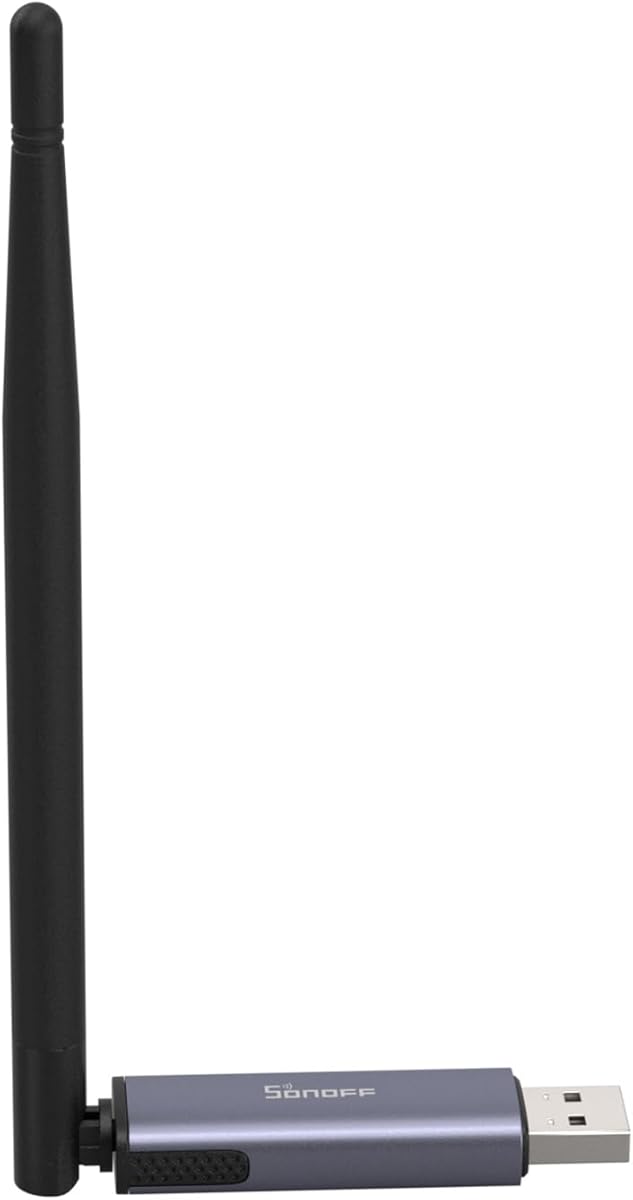
The SONOFF Zigbee 3.0 USB Dongle Plus MG24 has a 4.7 rating and is an excellent choice for users running Home Assistant, Zigbee2MQTT, or openHAB. Unlike a finished wall hub, this device is a compact coordinator that connects to a host computer or server over USB. Its EFR32MG24 chip is designed to provide faster automation processing and stable control of sub-devices.
We may earn a commission when you buy through this link, at no additional cost to you.
Platform compatibility is broad, with supplied information naming Home Assistant, Zigbee2MQTT, and openHAB as supported environments. It works with Zigbee 3.0 devices from ecosystems such as Philips Hue, Aqara, IKEA Tradfri, and SONOFF, although individual accessory features can depend on the coordinator software and the devices themselves. This makes the dongle a practical choice for builders who want direct control over the underlying network rather than a fixed consumer interface.
Flexible firmware flashing expands the possible roles. The dongle can be switched between Zigbee coordinator, router, and Thread RCP modes through the SONOFF dongle flasher or an add-on. The compact enclosure includes a USB extension cable, which lets users place the radio away from a crowded USB hub and reduce electromagnetic interference. Its default antenna gain is 3 dBi and can be optimized to 4.5 dBi for stronger signal and wider coverage.
The M6 and other turnkey hubs are easier for a nontechnical buyer, but this dongle delivers excellent flexibility for an enthusiast. Installation is not simply plugging in a consumer hub: the user must have a compatible host, select the appropriate firmware mode, and integrate the coordinator with the chosen automation software. For someone comfortable with that workflow, the 4.7 rating and modern radio make the SONOFF dongle a standout compact coordinator.
Switching among coordinator, router, and Thread RCP modes lets one compact device serve different network roles. The correct mode depends on the host software and the topology being created.
The extension cable can move the dongle away from dense USB equipment and improve radio conditions. Better placement may be more valuable than forcing every controller into the same enclosure.
We may earn a commission when you buy through this link, at no additional cost to you.
The Matter Smart Home Hub M1 Pro has a 4.2 rating and combines four notable functions in one compact unit: a Matter bridge, a Tuya Zigbee gateway, Thread Border Router functionality, and infrared control. That breadth makes it especially attractive to users who want connected lighting, curtains, switches, sensors, and older infrared appliances in a single platform-centered setup.
We may earn a commission when you buy through this link, at no additional cost to you.
The hub should first be added to the Tuya Smart or Smart Life app, after which compatible devices can be shared with supported Matter ecosystems including Apple Home, Google Home, SmartThings, and Alexa. A compatible Matter controller or border-router device is required, and the controls available after sharing depend on the target ecosystem, the sub-device, and its firmware. The product can support up to 128 compatible Tuya Zigbee sub-devices.
The built-in 38 kHz infrared transmitter adds a distinct layer of utility. Under unobstructed conditions, the reference range is up to nine meters in front and approximately four meters to the side for compatible air conditioners, televisions, and other infrared appliances. Infrared functions in third-party Matter ecosystems vary by appliance and platform, so users should verify that their devices can be learned and controlled through the intended interface.
Networking is flexible after setup: the M1 Pro supports 10/100 Mbps Ethernet and 2.4 or 5 GHz Wi-Fi. Initial activation requires Ethernet, while initial app pairing calls for a 2.4 GHz Wi-Fi network. Supported hub-side scenes and automations can run locally, although cloud services, notifications, voice assistants, and certain automation types still require internet access. The compact USB-C-powered design and broad function set make this a versatile choice, but the setup requirements deserve careful attention.
Built-in infrared control can bring compatible televisions, air conditioners, and other appliances into a connected routine. Placement and line-of-sight conditions will determine practical coverage.
Supported hub-side automations can continue during an internet outage, but not every feature is local. Cloud access, assistant commands, notifications, and some device actions still need an active connection.
We may earn a commission when you buy through this link, at no additional cost to you.
The THIRDREALITY Smart Bridge MZ1 has a 3.2 rating and offers a compact way to connect THIRDREALITY Zigbee end devices to Matter. Its core function is protocol translation: compatible Zigbee accessories can be incorporated into a broader smart home through a Matter controller. The result is useful for users who want THIRDREALITY devices to appear in Apple Home, Google Home, SmartThings, Home Assistant, or another supported platform.
We may earn a commission when you buy through this link, at no additional cost to you.
The hardware is deliberately simple, with a space-saving body and USB-C power interface. Configuration and ongoing management take place through the 3R-Installer application, which also supports over-the-air updates. This gives the bridge a defined role without requiring a separate power supply for every component. Its small footprint is particularly helpful where a full-size home hub would occupy valuable shelf or desk space.
The main restriction is its 2.4 GHz Wi-Fi operation. A modern home may have both 2.4 and 5 GHz networks, so the bridge must be placed on the appropriate band during setup. Users should also confirm that their specific sensors, switches, or other accessories are supported and that the features they need will be exposed after bridging. The broader compatibility list in the product title does not guarantee that every THIRDREALITY device or every function works with every named platform.
The MZ1 is best viewed as a targeted bridge rather than a general-purpose hub. It makes sense for a household that already uses THIRDREALITY Zigbee equipment and wants to add Matter access without replacing the entire device ecosystem. Its 3.2 rating calls for careful compatibility checking, but for the right device set, its simple form and multi-platform focus can be highly useful.
The bridge concentrates on bringing THIRDREALITY Zigbee devices into Matter ecosystems. This makes it a sensible choice for existing THIRDREALITY users rather than a universal radio controller.
The bridge requires a 2.4 GHz Wi-Fi network. Confirm the correct network band and signal coverage before setup, particularly in homes with separate guest or smart-device networks.
We may earn a commission when you buy through this link, at no additional cost to you.
The Matter Smart Wired Hub has a 3.3 rating and is designed for users who want a Tuya Zigbee 3.0 gateway connected to Thread accessories and exposed through Matter platforms. Its primary distinction is a required wired network connection, using an included network cable for operation. It supports voice control through Google Home, Alexa, and Apple HomeKit after compatible Thread and Zigbee devices have been added.
We may earn a commission when you buy through this link, at no additional cost to you.
The hub is built around cross-platform sharing. Compatible Tuya Zigbee-standard devices can be connected through the Tuya app or Smart Life app and shared with third-party platforms such as HomeKit. The product information notes that device support depends on Matter boundary routing, so not every Zigbee accessory is eligible. The phone and gateway also need to be on the same network during configuration, with the hub limited to 2.4 GHz Wi-Fi.
In terms of range, the built-in Zigbee transmitter is intended to penetrate walls and serve devices across multiple rooms. Thread signals can also be received over a longer distance. Users can create scene linkages for common routines and control supported Tuya Zigbee devices remotely through the Tuya app, Smart Life app, or Google Home app. Voice assistants can then control compatible devices after the necessary sharing and configuration steps are complete.
This hub is best for a carefully planned installation where Ethernet is available and the household is committed to Tuya-based accessories. Its 3.3 rating and several compatibility caveats make verification important. It does not support devices using Wi-Fi or Bluetooth, requires a network cable to run, and supports only 2.4 GHz wireless connectivity. Those restrictions reduce flexibility, but they can make behavior more predictable for compatible Thread and Zigbee devices.
Ethernet gives the hub a dedicated connection to the network and avoids relying entirely on a wireless band. This can suit a fixed installation with a nearby cable route.
A device must support the required Matter routing behavior to work through this gateway. Checking accessory requirements before installation can prevent difficult re-pairing later.
We may earn a commission when you buy through this link, at no additional cost to you.
The right controller depends on your devices, preferred automation platform, installation environment, and tolerance for technical configuration. These factors matter more than the broadest list of protocol names printed on a package.
Matter is intended to provide a common language across device categories and smart-home platforms, but support on a hub does not guarantee that every device or function will be exposed identically. Some products act as Matter controllers, others as bridges, and some require an additional border router. Check the precise role of the hub in the ecosystem you use, then review the individual device requirements. Voice control is another layer: Google Home, Alexa, Apple Home, and SmartThings may not expose the same switches, sensor conditions, or automation options.
Zigbee covers many bulbs, sensors, switches, locks, plugs, and curtain motors, but compatibility is not automatic. A hub may support Zigbee 3.0 while lacking support for a particular manufacturer, pairing method, firmware command, or specialized device. Look for named compatibility when possible and review any buyer limitations. If you already own devices, identify their exact models before selecting a controller, because changing a bulb is easier than re-pairing a lock, sensor, or motorized shade.
Local automation reduces latency and can keep essential routines functioning during an internet outage. However, the term may cover only selected scenes or actions. A hub can run a lighting routine locally while still sending notifications, voice commands, or cloud-dependent device states through the internet. Review which scenes, triggers, and device functions execute locally. Also note that a connection to a local network does not guarantee fully offline operation if the selected automation platform depends on cloud services.
A useful hub should support the radios your household actually needs. Matter describes an application standard, while Zigbee and Thread are lower-level network technologies; Thread border-router and Thread RCP roles are not automatically interchangeable. Z-Wave can be valuable for certain security and home-automation devices, but it adds no benefit to a Zigbee-only household. For mixed systems, use a hub with clearly defined roles rather than assuming that every product called a gateway can perform every bridging function.
Home Assistant users have very different needs from consumers seeking a ready-made mobile experience. A USB coordinator may provide direct control and broad software choice, while a dedicated local bridge may be easier to manage in a browser. Look for native ZHA, Zigbee2MQTT, MQTT, or other documented integrations, and consider whether firmware changes are acceptable. Confirm the coordinator role required by the selected software before purchasing, because installation and flashing can be more involved than a consumer plug-and-play hub.
A hub's advertised range is only one part of a successful radio network. Walls, floors, metal, power supplies, competing Wi-Fi systems, and the positions of battery-powered devices can all affect reliability. An external antenna, higher gain, or a low-interference radio design may help, but adding a second hub can be more effective in large or multi-level homes. Plan a central first location, avoid hiding the unit behind entertainment equipment, and test signal quality with the types of devices you actually intend to use.
Some hubs require Ethernet during activation even though they later support Wi-Fi, while others are designed exclusively for a wired connection. Others use 2.4 GHz only, though a few support dual-band Wi-Fi. Check not just the connector but the setup sequence and network band. A hardwired hub can provide a stable backbone in a fixed installation, but it needs a nearby Ethernet outlet. A wireless hub is easier to place but may be affected by congestion or poor signal at its intended location.
A hub is only as useful as the software used to pair devices, build routines, monitor status, and resolve problems. Consider whether the manufacturer offers a dedicated app, a local console, or integration through an existing platform. Over-the-air updates are valuable for security and compatibility, while local management can be useful if cloud access is unavailable. Buyers should also consider support for third-party brands and how much effort is required to move a device between ecosystems.
Begin by inventorying the devices you already own and the platforms you want to use. Record each model, protocol, pairing requirement, and desired automation before connecting the hub. Update the devices where possible, place the hub in an open central location, and connect it using the required power and network method. Some models require Ethernet during initial activation, and many expect the phone to remain on a specific Wi-Fi band, so read the setup sequence before beginning.
Install the relevant app or host software and complete the hub's initial pairing. Add one device at a time rather than automatically including every nearby accessory, because Zigbee products can sometimes be picked up by another controller. Confirm that each device appears in the intended room, platform, and device type. If a device will be shared through Matter, verify that the hub is acting in the required controller or bridge role and that a suitable border router is present.
After basic control works, build a small number of essential routines before creating elaborate scenes. Test automations under realistic conditions, including an internet outage if local operation is important. Keep the hub's firmware and management software updated, inspect connections for heat or instability, and keep the device ventilated. Change the device's password if it offers one, avoid exposing the hub to unnecessary public network access, and revisit the arrangement whenever walls, furniture, or new accessories alter radio conditions.
It depends on whether you want to control those devices through a Matter platform. A Matter bridge can expose compatible Zigbee accessories to ecosystems such as Apple Home, Google Home, SmartThings, or Alexa, but the exact features exposed may differ. Confirm device compatibility, the required Matter role, and whether a separate border router is needed before purchasing.
A Zigbee coordinator manages the low-level Zigbee radio network and pairs or communicates with Zigbee accessories. A Matter controller or bridge connects devices to the Matter application layer for broader platform use. Some products perform both roles, while others need another hub to provide Matter routing.
Some hubs can execute selected local automations during an outage, but remote control, cloud-dependent routines, voice assistants, notifications, and some device functions may stop working. Local support varies by model, so check which scenes and actions are described as local before relying on outage resilience.
Only if your device plan includes Thread accessories or your chosen automation platform benefits from a Thread border router or coordinator role. A purely Zigbee household can often choose a simpler hub, while mixed or future-oriented systems may benefit from a product that supports both networks.
A USB coordinator is usually better for technical users running Home Assistant, Zigbee2MQTT, or openHAB because it offers direct software control and flexible radio modes. A standalone hub is generally easier for a consumer who wants a mobile app, voice-assistant integration, and a more managed setup.
Stated capacities range from more than 125 devices to 128 devices or larger ecosystem descriptions, but the meaningful limit depends on the hub, software, device types, and radio conditions. Users with many battery-powered accessories across several floors should consider coverage and network design as carefully as the headline capacity.
The device may lack Matter support, use a bridge role that has not been configured correctly, or require specific routing behavior. Platform differences, firmware, and incomplete border-router support can also restrict visible controls. Start by confirming the accessory model and required Matter certification, then review the hub's sharing and pairing logs.
Place it in an open, central location that is convenient for power and network access. Avoid cabinets, entertainment units, and areas crowded by metal or high-interference electronics. Multi-level homes may benefit from one hub per floor, with accessory placement tested before finalizing the network.
The Aeotec Smart Home Hub is the most versatile overall option because it combines Matter, Zigbee, Z-Wave, SmartThings, Alexa, and Google Home support with local routines. The SONOFF Bridge Max is the best budget choice for buyers who value local web management, Matter bridging, Home Assistant integration, and a built-in alarm, while the ZBT-2 is the premium option for a dedicated Zigbee-and-Thread Home Assistant installation.
Most buyers should begin with their existing devices and chosen ecosystem rather than the broadest protocol list. Verify exact accessory compatibility, determine whether Matter is being used as a controller, bridge, or border-router role, and confirm how much automation remains local. Wired and Wi-Fi requirements, radio placement, app quality, and update support can matter as much as headline protocol support.
Ratings, product configurations, firmware, and prices can change over time, and compatibility details may also evolve as Matter, Zigbee, and Thread systems mature. Before purchasing, verify the current product listing, read the latest setup requirements, and check that every device you intend to connect is supported by the selected hub and destination platform.