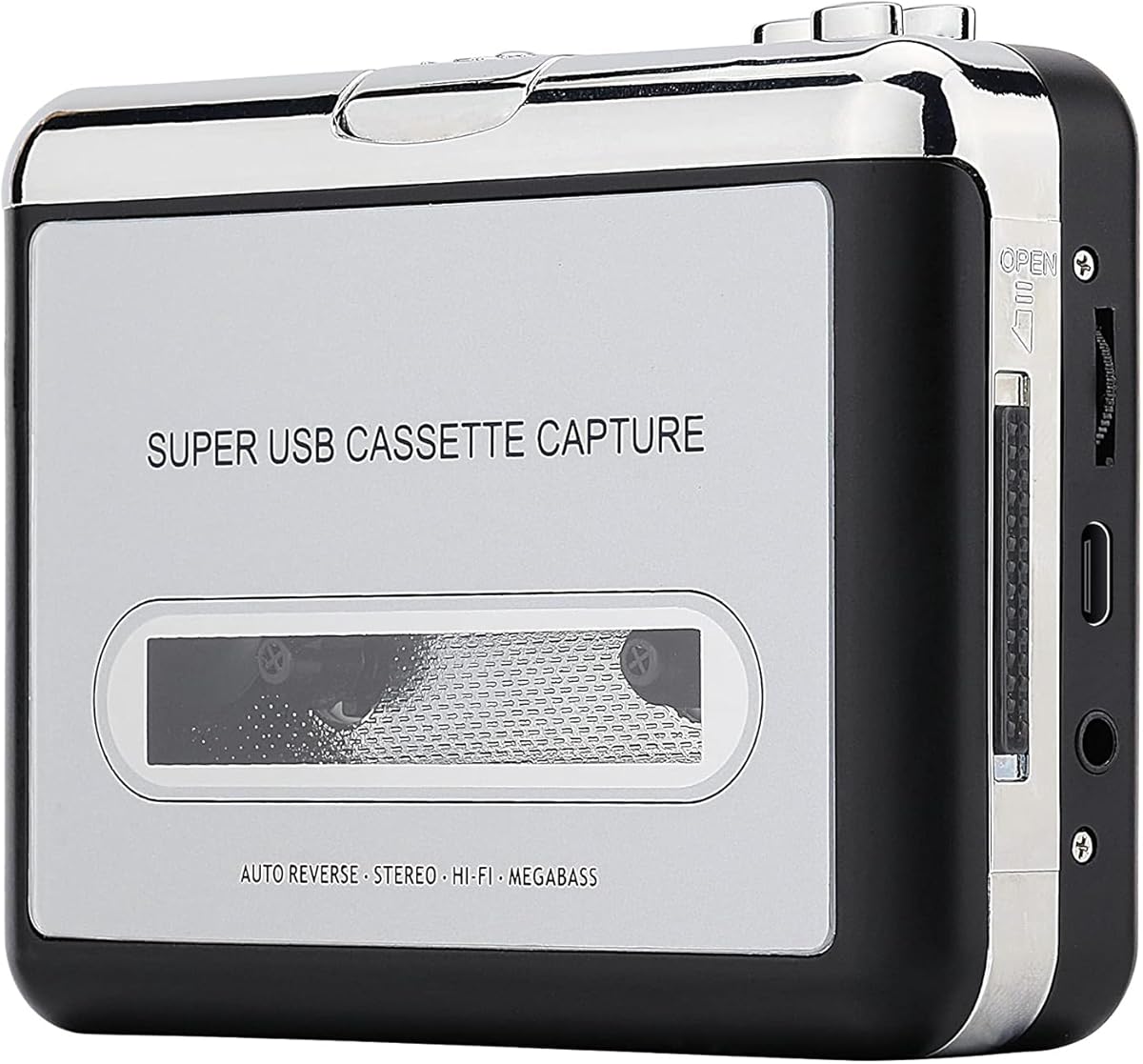
Reshow Cassette Tape Player
3.8Editor score
USB-connected MP3 conversion
Portable standard tape player
Converter software included
Our Cassette to MP3 Converter guide compares ten models for ease of use, recording options, storage, portability, and reliable digital transfers at home.
Cassette to MP3 converters preserve aging recordings by turning tapes into files that can be played, backed up, and organized on modern devices. A worthwhile converter should balance straightforward controls, accurate playback, useful recording options, and dependable storage compatibility while remaining small enough for home or travel.
We compared ten converters based on their documented features, including supported cassette formats, MP3 workflows, included storage, power options, playback functions, speaker output, connectivity, and software requirements. The list covers standalone devices, computer-assisted models, SD card recorders, and USB-focused converters for different collections.
Each review explains the strongest reasons to consider a particular model and any practical limitations. The featured picks offer the most compelling combinations of convenience, capability, and versatility, although product availability and pricing can change, so readers should verify current details before purchasing.
3.8Editor score

4.5Editor score

4.3Editor score
This side-by-side comparison highlights each converter's recording method, storage destination, playback features, and major hardware advantages, helping you identify the model that best matches your tapes, computer setup, and listening habits.


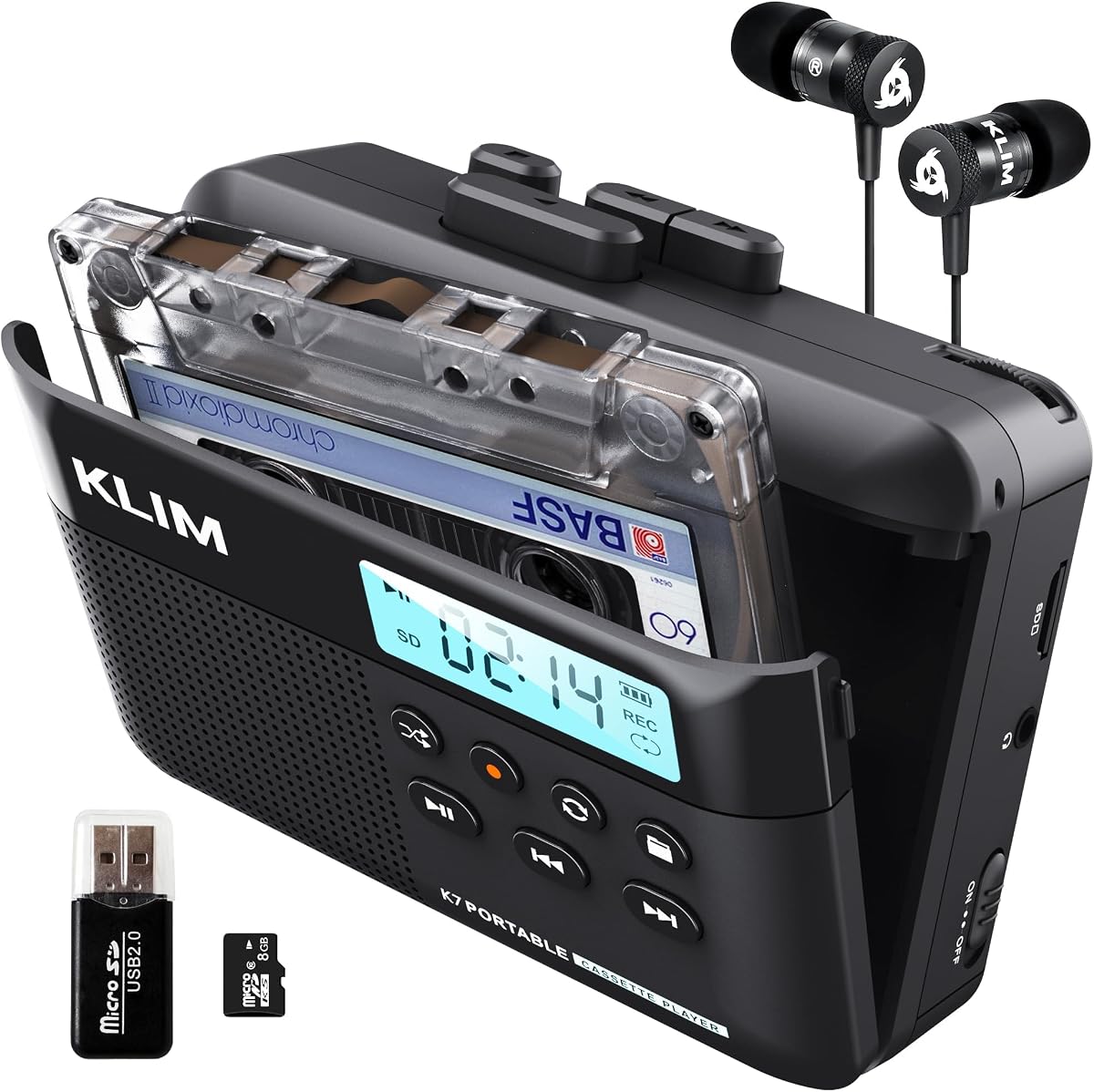


The K7 Cassette Player with a 16GB card is a versatile all-in-one option with a 4.2 rating. It converts cassette audio to MP3 files on an included SD card, plays those files through a built-in speaker or earphones, and can capture new audio through its microphone. Its combination of digital storage, portable playback, and rechargeable power makes it practical for both preserving tapes and listening to the resulting files.
We may earn a commission when you buy through this link, at no additional cost to you.
Its standout strength is the uncomplicated conversion process. The SD card and card reader are included, and the manufacturer states that no extra device or application download is required. A user can therefore move from a physical cassette to a digital MP3 file with relatively little setup. The 1000mAh rechargeable battery adds freedom, while the supplied Type-C cable, earphones, and manual make the package ready for use.
The microphone and integrated speaker broaden its role beyond conversion. It can record meetings, personal notes, or impromptu audio directly to the SD card and play back digital music stored there. However, it does not record to cassette tape itself, which means it cannot recreate physical mixtapes. The product information also does not specify compatibility with different tape formulations, so users should verify that detail for unusual Type IV or metal cassette collections.
This K7 is a strong recommendation for someone seeking a simple, self-contained converter without software or a computer. The included 16GB capacity gives new users substantial room to begin, while the portable design supports conversion at home or elsewhere. Those wanting an immediate digital archive with flexible playback and recording functions will probably find it more useful than a basic USB-only unit.
The key appeal is the direct path from cassette playback to MP3 files stored on the included SD card. Because the manual and reader are supplied and no app download is specified, the device is approachable for users who want to avoid complicated editing software.
The built-in microphone and speaker make the K7 useful for new recordings and convenient playback. It can serve as an SD card music player, while the 3.5mm earphone jack supports private listening with the included earphones.
We may earn a commission when you buy through this link, at no additional cost to you.
The SEMIER Small Cassette Player Recorder Converter earns a 4.0 rating and offers one of the broadest conversion workflows in this guide. It can transfer tapes to MP3 files on the included 16GB SD card or use a USB cable and the included Audacity software for computer-assisted capture. That choice makes the device suitable for both people who prefer a computer-free process and those who want more control over the resulting files.
We may earn a commission when you buy through this link, at no additional cost to you.
Compactness is another meaningful advantage. The unit measures 6.3 by 3.9 by 1.2 inches and weighs 0.52 pounds, making it manageable during a long conversion session. Its LCD provides visual navigation, a 2W built-in speaker supports shared listening, and a 3.5mm earphone jack allows private playback. Power can come from the included USB-C cable or four AA batteries, which adds flexibility for travel or locations where outlets are inconvenient.
There are important boundaries to understand. The product is designed for Type I tapes and does not support Type IV or metal formulations, so collectors with those tapes need another solution. It also lists recording to cassette, computer, and SD card functions, but the included information does not fully clarify every operating sequence. Buyers should therefore read the manual before beginning, particularly if they plan to use the microphone or tape-recording functions.
Overall, the SEMIER is most attractive to users who want two ways to digitize recordings and value a compact body with a display. The bundled SD card, reader, Audacity software, manual, and USB-C power cord create a broad package. It is a sensible choice for standard Type I collections when the ability to choose between standalone and computer-assisted workflows matters more than compact dimensions alone.
Saving directly to SD card is the simplest route, while USB transfer through Audacity provides a conventional desktop workflow. Having both options lets users begin without a computer and still use editing software when they want more involved file management.
The LCD, 2W speaker, headphone jack, and dual power options cover playback and portability needs. The stated dimensions and weight also make the unit relatively easy to carry between a collection and a listening location.
We may earn a commission when you buy through this link, at no additional cost to you.
The second-generation ClearClick Cassette Tape to USB 2.0 is the leading Editor's Choice, combining a 4.5 rating with one of the category's most approachable workflows. It converts audio cassette tapes into high-quality MP3 files stored on a USB flash drive, and the package includes a 16GB drive. Most importantly, the device does not require a computer, software installation, or driver setup.
We may earn a commission when you buy through this link, at no additional cost to you.
Automatic track splitting is the feature that distinguishes it from more basic capture devices. Instead of forcing a user to manually divide an entire side into separate files, it can create individual MP3 tracks automatically. This makes the resulting archive easier to browse on a phone, computer, or media player. The converter also doubles as a portable cassette player, with earbuds included, so it remains useful before or after digitization.
Its design is focused rather than multifunctional. Storage goes to a USB flash drive rather than an SD card or directly to a phone, and the supplied information does not advertise microphone recording or the ability to write onto blank cassette tapes. Users who need those functions may prefer another model, while anyone focused on clean cassette-to-MP3 transfer will find the narrower design easier to understand.
For a first conversion project, this ClearClick offers an excellent balance of simplicity and useful organization. It removes the two largest barriers for many beginners: installing capture software and manually splitting recordings. The included drive, instant setup claim, two-year warranty, and USA-based support further improve the ownership experience, making it our most approachable dedicated standalone converter.
Automatic splitting turns a tape side into individual MP3 files without requiring extensive manual editing. That organization makes a newly digitized collection easier to navigate and prepares it for playback on devices that display tracks separately.
Because the converter saves directly to the included USB flash drive, a computer is not required during capture. Users can begin the transfer, then connect the drive to a computer later to copy, rename, back up, or organize the MP3 files.
We may earn a commission when you buy through this link, at no additional cost to you.
The silver Reshow Cassette Tape Player has a 3.8 rating and delivers a straightforward computer-assisted method for converting tapes to MP3. It connects through USB and works with laptops and personal computers, making it a practical choice for people who already maintain an organized digital music library and do not need a standalone workflow.
We may earn a commission when you buy through this link, at no additional cost to you.
Its strengths are familiar and accessible. The device plays standard cassette tapes, accommodates standard 3.5mm headphones or an AUX connection, and supplies converter software, a guide, and a 5V DC USB power cord. This package supports both initial setup and continued playback. Its vintage-style housing also gives it the appearance of a conventional portable cassette player rather than a technical capture box.
The main limitation is dependence on a computer during conversion. Users need to follow the included software instructions and connect the device appropriately, so it may be less convenient for someone who wants completely independent archiving. Automatic track splitting is not mentioned in the supplied specifications, and no included removable storage or microphone function is listed. These omissions keep it below the more versatile devices in this comparison.
Despite those constraints, the Reshow remains a sensible lower-cost entry point for basic collections. Its 3.8 rating is the lowest in the group, so buyers should consider customer feedback and product expectations carefully. It is best suited to a user who values familiar computer conversion, portable tape playback, and a straightforward package over automatic organization or wireless functions.
The USB connection and included converter software provide a recognizable route from tape to MP3. This approach is particularly useful for users who intend to edit file names, create folders, and integrate transfers into an existing computer-based collection.
The Reshow is also designed as a standard compact tape player. Standard headphones work through the 3.5mm connection, and an AUX output provides a way to listen through a car stereo or another compatible audio system.
We may earn a commission when you buy through this link, at no additional cost to you.
The K7 Cassette Player with an 8GB SD card carries a 4.3 rating and offers a compact, rechargeable way to convert tapes to MP3. It saves digital audio to the supplied SD card, includes a card reader, and can play the stored music through its integrated speaker or connected earphones. The package also contains a Type-C cable, earphones, and a manual.
We may earn a commission when you buy through this link, at no additional cost to you.
Portability is central to its design. A 1000mAh rechargeable battery and stated two-hour charging time reduce the need to remain near an outlet. The built-in microphone also allows new audio to be recorded directly to the SD card, which broadens the device's use beyond older tapes. An SD card music player function means converted files can be reviewed without first transferring them to a computer.
The included 8GB card is enough to begin a modest collection, but it offers less space than the 16GB and 32GB K7 variants in this guide. Users planning to digitize many albums should consider adding compatible storage or choosing a larger configuration. The product still cannot record onto cassette tape, and its supplied information does not clarify tape formulation compatibility, another point to confirm before converting an entire collection.
This version is ideal for people who prioritize a small rechargeable format over maximum included capacity. It offers the same broad combination of tape conversion, microphone recording, speaker playback, and SD card use as the other K7 variants. For a first or smaller archive, its higher 4.3 rating and compact feature set make it a strong all-purpose recommendation.
The rechargeable battery, lightweight portable format, and included card reader allow conversion away from a permanent computer setup. It is a practical option for digitizing tapes in stages or reviewing MP3 files immediately after recording.
The supplied 8GB card is more limited than the higher-capacity K7 bundles. It works well for a starter collection, though frequent archive builders may need additional storage or may prefer a model that arrives with more room.
We may earn a commission when you buy through this link, at no additional cost to you.
The K7 Cassette Player with a 32GB SD card has a 4.2 rating and is the highest-capacity version of the recurring K7 design. It converts cassette audio into MP3 files without requiring a separate device or app download. The generous card, bundled reader, rechargeable battery, and portable playback functions make it well suited to larger archival projects.
We may earn a commission when you buy through this link, at no additional cost to you.
Like the other K7 models, it combines several roles in one enclosure. Tape playback feeds the conversion process, digital files save to the SD card, and the built-in microphone can record fresh audio directly to that card. A built-in speaker supports group listening, while a 3.5mm jack and included earphones handle private listening. The 1000mAh battery reportedly reaches a full charge in two hours.
Its larger storage card is the clearest reason to choose this version over the 8GB or 16GB alternatives. It offers more room for digitized albums, spoken-word recordings, and microphone captures before files need to be transferred and archived. This does not remove the need for backups, and card capacity can vary in practical use depending on file length and format. The model still cannot write new recordings onto cassette tape.
For collectors planning a substantial conversion project, this K7 combines useful capacity with a straightforward standalone process. Its feature set matches the smaller variants, but the supplied storage reduces the likelihood of running out of room early. Users who prefer the K7 approach and expect to digitize many tapes will find the 32GB configuration especially convenient.
The 32GB card provides the most room among the listed K7 configurations. It is a sensible choice for multi-tape projects or users who also plan to store microphone recordings on the same device.
The built-in speaker, microphone, headphone connection, and SD card player create a useful mix of functions. This makes the converter more versatile than a basic capture-only device while preserving a simple physical design.
We may earn a commission when you buy through this link, at no additional cost to you.
The black Reshow Cassette Tape Player has a 3.9 rating and provides a compact, familiar way to transfer cassette audio to a computer. It supports USB conversion to MP3 and doubles as a standard portable tape player. The converter software, user guide, and 5V DC USB power cord are included, giving users the main essentials for setting up transfers.
We may earn a commission when you buy through this link, at no additional cost to you.
Its 3.5mm connection supports standard earbuds and headphones, and the product documentation specifically mentions compatibility with a 3.5mm AUX input for connection to a car stereo. This makes it useful for listening before conversion as well as after files have been transferred. The lightweight, compact form is appropriate for taking tapes between storage and a computer.
Users should not expect the same degree of automation found in dedicated standalone converters. A computer and the included software are part of the conversion path, and automatic track splitting is not stated. No removable storage is listed as included, so the process begins with the computer rather than a ready-to-use USB drive. These limitations are reasonable for a straightforward computer-centered design but matter when comparing it with newer alternatives.
This Reshow version is a good fit for users who prioritize portability, standard headphone compatibility, and direct computer transfer without seeking a large feature set. Its rating is slightly higher than the silver model's rating, though both share the same core workflow and included accessories. A buyer with a Windows or compatible computer and a small-to-moderate collection will find it practical.
The supplied software and USB cable create a direct path from cassette playback to an MP3 file on a computer. This supports users who want to name, sort, and back up files as part of an established digital library workflow.
Its lightweight shell and standard 3.5mm connection avoid the learning curve of specialized controls. It can serve as a straightforward player for tapes before or after they are converted.
We may earn a commission when you buy through this link, at no additional cost to you.
The USB Cassette to MP3 Converter has a 3.8 rating and focuses on standalone capture with useful automation. It records a cassette manually or automatically onto a USB flash drive, after which the files can be transferred elsewhere. Because no computer is required for capture, it is a practical bridge between physical tapes and a digital library for users who want a straightforward all-in-one process.
We may earn a commission when you buy through this link, at no additional cost to you.
Automatic mode is particularly useful for spoken-word recordings. The converter can save each song or sentence into a separate MP3 file, which prevents an entire audiobook side from becoming one unwieldy file. It also automatically switches sides during conversion, reducing the need to monitor and manually flip the tape. A volume control serves both recording and playback, giving the user direct adjustment over the captured result.
Storage compatibility requires attention. The unit supports USB 2.0 and USB 3.0 drives in FAT or FAT32 formats up to 128GB, and the manufacturer recommends a fast drive with a 4M to 6M per second read rate to help prevent skipping. Power can come from USB or two AA batteries, although the product notes that USB power is more stable. A carry bag and headphones are also included.
This converter is best for listeners who want automatic segmentation, reverse-side handling, and computer-free recording. It does not arrive with a clearly identified included USB drive, so compatible storage must be considered separately. For users willing to prepare a suitable drive, it provides a mature and versatile workflow for both music and long spoken-word recordings.
The automatic mode can divide songs or sentences into separate MP3 files. This is especially helpful for audiobooks, interviews, and tapes containing many short segments that would otherwise require extensive manual editing.
FAT or FAT32 formatting and the stated 128GB limit should be checked before recording. A sufficiently fast USB drive also helps reduce skipped playback during conversion, while USB power is described as more stable than battery power.
We may earn a commission when you buy through this link, at no additional cost to you.
The Gracioso Bluetooth Cassette to MP3 Converter has a 4.3 rating and is the most feature-rich model in this guide. It combines tape playback, direct USB MP3 recording, Bluetooth transmission and reception, a 6W speaker, a 3.5mm earphone jack, and a rechargeable 2000mAh battery. It can also record digital audio back onto blank cassette tapes, expanding its role beyond one-way preservation.
We may earn a commission when you buy through this link, at no additional cost to you.
Its dual Bluetooth modes are the standout feature. Transmitter mode can send tape or USB audio wirelessly to compatible headphones or speakers. Receiver mode can accept audio from a phone, tablet, or computer and play it through the built-in speaker. This makes the device a bridge between physical media and modern wireless listening, while also enabling the creation of new physical mixtapes from digital sources.
Direct USB recording requires a compatible drive in FAT32 format, with the supplied information specifying support for 4GB to 32GB USB drives. Files are recorded as MP3 without requiring a computer or complicated software. The 2000mAh battery is stated to provide up to 10 hours in Bluetooth mode and six hours during tape playback, with a four-hour charging time. The 6W speaker is notably more powerful than the smaller speaker in the SEMIER.
This is the best choice for users who want extensive functionality and do not mind a more capable device. It stands out for wireless audio, strong built-in sound, flexible USB conversion, and physical tape recording. Buyers focused strictly on the simplest archive process might prefer the ClearClick, while this model makes the most sense for listeners who want the cassette format integrated with contemporary devices.
Bluetooth transmitter mode sends tape or USB audio to wireless headphones or speakers, while receiver mode plays phone or computer audio through the built-in 6W speaker. The two-way design supports private listening and convenient group listening.
Besides capturing tapes to USB as MP3 files, the device can record digital music onto blank cassettes. That unusual capability makes it appealing to people who enjoy creating physical mixtapes as well as preserving existing ones.
We may earn a commission when you buy through this link, at no additional cost to you.
The K7 Cassette Tape Player with MP3 Converter, Microphone, Speaker and Battery has a 4.2 rating. It converts cassette tapes to MP3 files on an included 16GB SD card and functions as a portable digital music player. A built-in microphone records new audio to the card, while a built-in speaker and included earphones provide flexible listening options.
We may earn a commission when you buy through this link, at no additional cost to you.
Its self-contained design minimizes setup. The card reader, Type-C charging cable, earphones, and user manual are included, and the manufacturer specifies that no additional device or app download is needed. The 1000mAh rechargeable battery charges in approximately two hours, making the unit convenient for moving through a collection without repeatedly searching for an outlet.
Compared with specialized capture-only converters, the K7 does not advertise automatic track splitting, cassette-side reversal, or multiple conversion destinations. It also cannot record onto blank cassettes. Users wanting advanced automation should examine the ClearClick or USB converter, while those needing Bluetooth should look toward the Gracioso. Within its simpler design, the K7 remains cohesive and easy to understand.
This model is a strong general-purpose recommendation for a small-to-medium collection or for a user who wants one device for tape conversion, digital playback, and microphone recording. The 16GB card provides a practical starting capacity, and the five-year assurance adds reassurance. It is particularly attractive for users who prioritize portability and uncomplicated operation.
Cassette playback, SD card conversion, microphone recording, and digital music playback are combined in one portable enclosure. This reduces the need for separate devices when preserving tapes or capturing short new recordings.
The included SD card, card reader, earphones, Type-C cable, and manual cover the core accessories needed to begin. A full charge in approximately two hours supports portable use during a conversion project.
We may earn a commission when you buy through this link, at no additional cost to you.
The best cassette to MP3 converter depends on your collection, tolerance for computer software, need for physical recording, and preferred storage format. Reviewing these factors before buying helps avoid paying for functions you will not use or encountering a workflow that does not fit your setup.
A standalone converter records directly to removable storage and can be used without a computer. This is often the simplest choice for listeners who want to begin immediately, while computer-assisted models provide access to editing software, file naming, and more control over how recordings are organized. The SEMIER supports both approaches, whereas the ClearClick focuses on standalone USB capture and both Reshow models rely on a computer.
Choose standalone operation for convenience, and choose computer-assisted conversion when you want a hands-on workflow for sorting and refining the resulting files.
SD cards and USB flash drives both provide removable storage for MP3 files. SD cards are compact and commonly used in portable media devices, while USB drives are convenient for moving files directly to a computer. Pay attention to included capacity, supported capacity, formatting requirements, and drive speed. The Gracioso requires a FAT32 drive within its stated 4GB to 32GB range, while the standalone USB converter supports FAT or FAT32 drives up to 128GB.
Match the storage format to your computer habits: use SD cards for a compact media workflow and USB drives when direct computer transfer is the priority.
Not every converter supports every cassette formulation. The SEMIER is documented for Type I tapes and explicitly excludes Type IV and metal tapes. Other products do not state their supported formulations in the supplied information, so buyers should verify those details before beginning a large archive. Compatibility is especially important for rare, valuable, or professionally recorded tapes.
Confirm tape type support before ordering, especially if your collection includes Type II, Type IV, metal, or unusually formatted cassettes.
Automatic file splitting can save considerable editing time when a tape contains multiple songs, sentences, or chapters. The ClearClick includes automatic track splitting, while the standalone USB converter can save songs or sentences individually in automatic mode. Basic converters may create one continuous file, requiring the user to divide it later with software.
Prioritize automatic segmentation for albums and audiobooks, but choose a simpler model if you prefer to handle track boundaries yourself.
A built-in microphone lets a converter capture new audio directly to digital storage, while an integrated speaker enables shared listening. The Gracioso goes further by accepting digital audio through Bluetooth and recording that audio onto blank cassettes. A 3.5mm earphone jack is useful for private listening, and a larger built-in speaker can make group playback more practical.
List the secondary functions you truly need: microphone capture, physical tape recording, Bluetooth, a speaker, or simple headphone playback.
Power requirements determine where you can use the converter. The K7 models use a rechargeable 1000mAh battery, while the Gracioso has a larger 2000mAh rechargeable battery. The SEMIER can use USB-C power or four AA batteries, and the standalone USB converter can run from USB or two AA batteries. USB power is described as more stable for recording, but batteries can be valuable when no outlet is nearby.
Consider battery life, charging time, and outlet access. For stationary archiving, stable USB power may be preferable; for mobile listening, a rechargeable battery offers better convenience.
Built-in speakers range from the SEMIER's 2W unit to the Gracioso's 6W speaker. A more powerful speaker can improve shared listening, though output specifications alone do not guarantee the perceived sound quality of a tape. Bluetooth adds another layer by supporting wireless headphones, speakers, and phone or computer audio. Only the Gracioso in this list offers explicit dual Bluetooth operation.
Choose a stronger speaker or Bluetooth support for flexible group and wireless listening; a standard headphone jack is sufficient for personal use.
A complete package can reduce setup time and eliminate separate purchases. The ClearClick includes a 16GB USB drive, while the K7 versions include an SD card, reader, earphones, cable, and manual. The SEMIER adds Audacity software and a USB reader. Warranty length and technical support are also relevant, with the ClearClick offering two years and the K7 products a five-year assurance.
Check the box contents before ordering so you can identify missing storage, cables, software, earphones, or documentation that you may need to obtain separately.
Before transferring recordings, inspect the cassette shell and exposed tape for cracks, tangles, dirt, or warping. Rewind the tape, confirm that the converter supports its tape type, and read the included manual to learn the controls for recording, playback, saving, and stopping. For computer-based units, install the supplied software and test a short recording before processing an entire collection.
Connect the converter to the appropriate storage and power source. Play the tape in real time while monitoring the volume and input level, because the converter captures what it hears. Use manual mode when you want precise control over each recording, or automatic mode when song and sentence splitting suits the material. Keep the device stable and avoid pressing transport controls while a tape is changing direction.
After conversion, rename and review the MP3 files, then copy them from the SD card or USB drive to a computer and create a second backup. Store removable media in its protective case, keep the cassette player dry and away from extreme heat, and clean the tape path according to the manual. Remove batteries from battery-powered units during long periods of storage to help prevent leakage.
It depends on the model. The ClearClick, K7, Gracioso, and standalone USB converter can save files directly to removable storage without a computer during capture. Both Reshow models use a USB connection and included converter software, so a compatible computer is part of their workflow. Even standalone devices usually need a computer later to copy, rename, back up, or organize the captured files.
They digitize the audio as it plays, but they cannot restore information that has faded, stretched, or become damaged. Conversion creates a convenient digital copy and stops further playback wear on the original. For the best result, use a clean, well-maintained tape mechanism, capture in a quiet setting, and keep the original recording as an additional backup.
Both SD cards and USB flash drives work well, but the best choice depends on how you plan to move and use the files. SD cards suit compact media players and devices with card slots, while USB drives are convenient for immediate transfer to a computer. Check each converter's supported capacity and formatting requirements, especially for models that specify FAT32.
Only if the device provides automatic or manual splitting. The ClearClick includes automatic track splitting, and the standalone USB converter can divide songs or sentences into separate files in automatic mode. Other devices may record the tape side as one continuous file, requiring later editing with audio software.
Most cannot. The K7 models record to the SD card but explicitly do not record onto cassette tape. The Gracioso is the standout because its Bluetooth receiver mode can receive digital music and record it onto blank cassettes. The SEMIER is also described as supporting cassette recording, so its manual should be checked for setup details.
Support varies by model. The SEMIER is explicitly designed for Type I tapes and does not support Type IV or metal tapes. For the K7, ClearClick, Reshow, USB converter, and Gracioso, the supplied information does not state all supported tape formulations. Check the manufacturer's current specifications before converting unusual or valuable tapes.
Copy every completed conversion from the SD card or USB drive to a computer, then maintain another copy on a separate drive or cloud service. Use descriptive filenames and preserve the original tape as well. Two copies in separate locations reduce the risk of losing a collection if a card fails or a file is accidentally deleted.
Most models include a 3.5mm earphone jack, and both Reshow models specifically support standard headphones and AUX connections. The SEMIER also includes a headphone jack, while the Gracioso combines a 3.5mm jack with a 6W speaker and Bluetooth output. Confirm compatibility with your preferred listening equipment before conversion.
The ClearClick is the easiest all-around starting point for most users because it needs no computer, includes a USB drive, and separates tracks automatically. The Reshow offers a lower-cost computer-assisted route, while the Gracioso stands apart with dual Bluetooth, a stronger speaker, and the ability to record digital audio back onto blank cassettes.
For other needs, the SEMIER provides both SD card and USB conversion but is limited to Type I tapes. The K7 family provides a portable rechargeable design with microphone recording and SD card playback in 8GB, 16GB, or 32GB configurations. The standalone USB converter is particularly useful for automatic sentence or song segmentation and automatic tape reversal.
Before purchasing, verify tape compatibility, storage requirements, power options, and whether the conversion workflow suits your computer habits. Product availability and pricing can change, so compare the current listing and included accessories at the time of purchase, then back up every completed digital conversion in more than one location.