
Pinwheel Plus 6
3.0Editor score
Remote caregiver management portal
Social media and adult apps excluded
Triple camera with 128GB storage
Choosing a safe phone for a child or teenager is not simply a matter of finding a small or inexpensive device. A useful first phone must balance communication, entertainment, privacy, location awareness, and parent oversight while remaining appropriate for the child’s age, maturity, and daily routine.
We compared these ten phones using the information provided, focusing on parental controls, contact and message management, camera restrictions, app availability, screen-time features, hardware, connectivity, and intended age group. The list includes tightly controlled phones, conventional Android devices, compact models, and camera-free educational alternatives.
Each review explains where a product stands out, where its controls fall short, and which family it may suit best. Product ratings and specifications can change over time, so check the current listing and confirm cellular compatibility, service terms, and parental-control features before purchasing.
3.0Editor score

4.0Editor score

4.2Editor score
As an Amazon Associate we earn from qualifying purchases.
This side-by-side comparison highlights the central differences among the ten phones: age suitability, parental oversight, app and web restrictions, camera access, connectivity, and the balance between a full smartphone experience and a deliberately limited device.

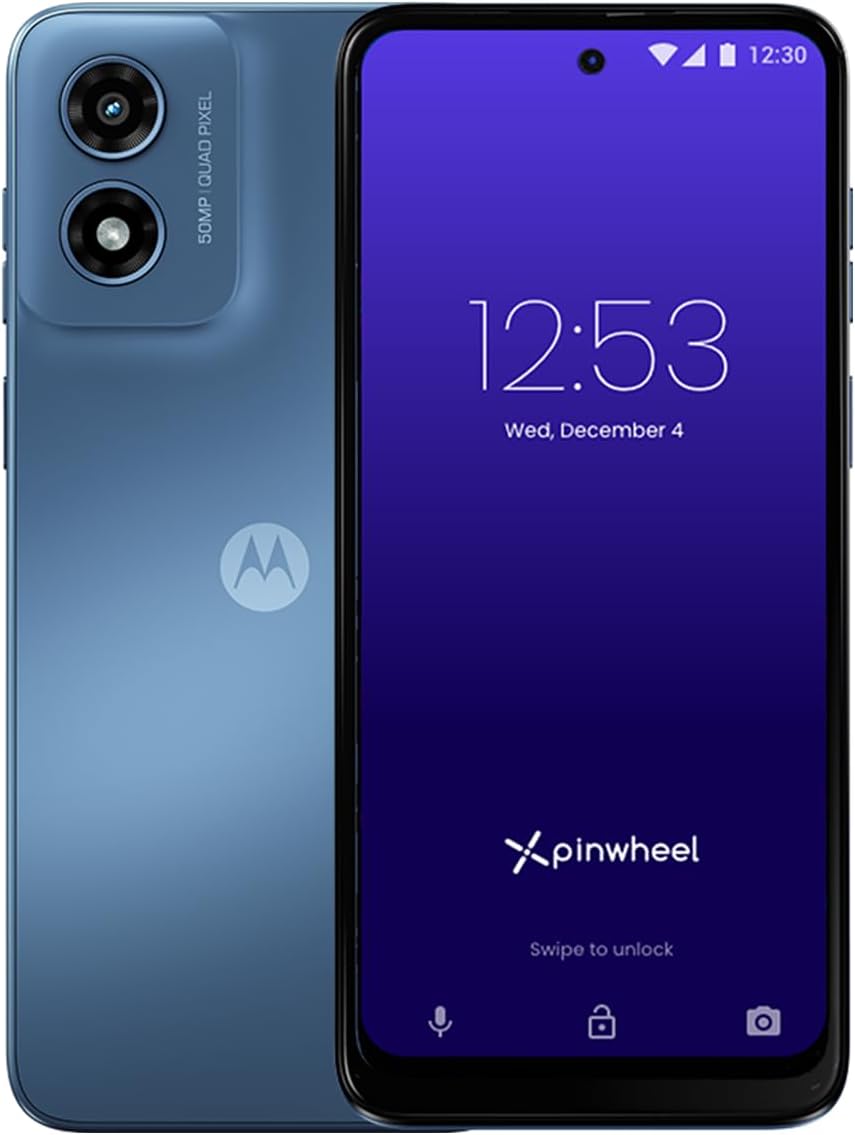


The Pinwheel Plus 6 is the most complete managed smartphone in this guide for families seeking a phone that can support both a younger child and a teenager without immediately handing over unrestricted Android access. It carries a 3.0 rating, but its defining strength is the combination of a 6.7-inch display, 5G compatibility, 128GB of storage, a 50MP triple-lens camera, and a caregiver portal with remote management functions. The device is aimed at children and teens ages eight through eighteen.
We may earn a commission when you buy through this link, at no additional cost to you.
Its safety model is unusually broad. Parents can create a safelist of approved contacts, review text messages and call history, and set schedules that determine when particular applications and contacts are available. The device excludes social media and adult applications while offering access to a large app catalog and more than 1,200 safety ratings for parents. It also blocks spam and stranger calls or texts, while an optional web browser can be added according to the family’s needs.
There are trade-offs. The portal is not necessarily part of the permanent hardware cost because one month of the subscription is included and continued remote oversight depends on the service arrangement. The listing also indicates that the cellular offer includes unlimited talk and text with 5GB of high-speed data, while compatible SIM alternatives are available. Some families may prefer a camera-free device, and others may find the optional browser more freedom than they want.
This is a strong recommendation for a child entering the first-phone stage or a family that wants one managed device to evolve over several years. Parents who value granular remote oversight, contact filtering, age-appropriate app access, and a normal-looking smartphone will find the trade-offs reasonable. Those seeking the most restrictive experience should choose a camera-free or call-only option instead.
The Caregiver Portal can centralize contact approvals, message visibility, call history, and app or contact schedules. That gives parents a way to adjust permissions remotely as school schedules, friendships, and responsibilities change, rather than physically modifying the phone every time.
Children can begin with basic calling and texting and then gain access to approved applications as they mature. This staged approach makes the Plus 6 more useful over a longer period than a device limited to a small set of child-oriented activities.
We may earn a commission when you buy through this link, at no additional cost to you.
The Genesis 4 offers a capable managed smartphone experience for children and teenagers, with particular emphasis on parent oversight. Its 1.6 rating is the lowest among the products shown, which deserves attention, but the underlying feature set remains closely aligned with the Pinwheel approach: a Caregiver Portal, contact safelisting, message and call visibility, scheduled app access, and a large catalog without social media or adult applications.
We may earn a commission when you buy through this link, at no additional cost to you.
The hardware specification includes a 6.7-inch display, 128GB of memory, 4GB of RAM, a dual-lens 50MP rear camera, and an 8MP front camera. This makes it a more conventional phone than the learning toys and restricted call devices in the list. Families can use the included cellular service or consider a SIM from a compatible carrier, and the device is unlocked rather than tied to one network.
Network compatibility is the most important practical limitation. The supplied information says the Genesis 4 supports AT&T and T-Mobile but not Verizon or 5G networks. Parents who live in an area with strong coverage from one of the supported networks may find that limitation acceptable, while Verizon customers or households expecting 5G should choose a different model. The low published rating also makes it especially important to read recent customer feedback before ordering.
Despite those concerns, the Genesis 4 may suit a family seeking a conventional-looking first phone with strong centralized controls. It is most appropriate for children ready for approved apps but not ready for social media, and for teens who benefit from structured schedules. Confirm carrier compatibility and understand the ongoing caregiver-service arrangement before purchase.
Restricting calls and messages to parent-approved contacts gives children a way to communicate without being exposed to unknown numbers. This is especially helpful during the transition to independent travel, school activities, and changing social circles.
The catalog permits many applications while excluding social media and adult-oriented choices. Parents can add approved apps gradually and use the more than 1,200 ratings to evaluate suitability before installation.
We may earn a commission when you buy through this link, at no additional cost to you.
The Pinwheel Slim 6 delivers the safety features associated with a managed kid phone while offering a more modest hardware configuration. It has a 3.5 rating and targets ages eight through eighteen. Parents can use the Caregiver Portal to safelist contacts, inspect text messages and call history, and set schedules for application and contact availability, making it one of the strongest value-oriented options in the guide.
We may earn a commission when you buy through this link, at no additional cost to you.
The phone has a 6.5-inch IPS LCD display, 64GB of storage, and a 50MP camera. Most notably, the product information claims a four-day battery, a valuable characteristic for a child who may need to reach a parent after school activities or during a long day. The device is unlocked and can work with the offered Pinwheel Wireless service or a SIM from a major carrier, including Verizon, AT&T, and T-Mobile.
Compared with the Pinwheel Plus 6, the Slim model provides less storage and a single camera rather than a triple-lens system. Its 3.5 rating is more encouraging than the ratings attached to the two other Pinwheel-branded models, though published feedback should still be considered. Families must also review cellular service details and the continued availability of caregiver-portal features before making a long-term commitment.
This is a compelling choice for parents who prioritize the controls more than high-end cameras or maximum storage. The long stated battery life and broad carrier compatibility make it especially practical for a child who is not yet a confident smartphone user. It also works for teens who need controlled app access and family contact management.
A stated four-day battery can reduce the likelihood that a child misses an important call because the phone was not charged overnight. It also makes the device more practical for school, outings, and travel where access to a charger may be uncertain.
Because the phone is unlocked, families can use the included service option or a compatible third-party SIM. That flexibility can be useful when household coverage, travel patterns, or existing account arrangements make one network more convenient than another.
We may earn a commission when you buy through this link, at no additional cost to you.
The Secure Phone 4G GPS Tracker is built for families that value restriction over entertainment. It has a 4.2 rating and offers a touchscreen phone with real-time tracking, but no internet, games, applications, or spam calls. Calls and texts work only with numbers programmed by parents, creating one of the most controlled communication environments in this roundup.
We may earn a commission when you buy through this link, at no additional cost to you.
This degree of limitation can be valuable for children with autism, dementia, special needs, or difficulty navigating conventional smartphone menus. It can also serve as a simple communication device for a teen or elderly family member. The included SIM card supports 4G GPS tracking, while the parent-managed calling list removes the possibility of a child accidentally contacting a stranger or exposing personal information through unrestricted apps.
The tradeoff is substantial. Families must purchase cellular service from Secure Phone and cannot use their own plan. The device offers almost none of the flexibility, education, entertainment, or personal expression that makes a full smartphone attractive to a teenager. It is therefore less likely to satisfy a social teen who expects messaging, games, photography, and app access.
This phone is best for a child who needs a dependable way to reach a small set of approved family members and whose priority is safety rather than a full mobile experience. Parents should compare the required service arrangement, activation process, and tracking features carefully. For a typical independent teenager, a managed Android phone will usually offer a better balance of usability and protection.
Removing the internet, games, and apps reduces opportunities for unsafe content and accidental purchases. The result may be less exciting for a child, but it can also make the device easier to understand and supervise.
Real-time tracking gives caregivers a way to check the phone’s location. Families should still explain the feature to the user, set expectations around when it is used, and treat location monitoring as part of a broader trust-building approach.
We may earn a commission when you buy through this link, at no additional cost to you.
The G-Mee Connect Pro is a conventional Android phone built around a strong privacy decision: it has no cameras. It carries a 4.0 rating and is described as suitable for children age ten and older, as well as adults who want a simple secondary device without photography. Its app locker lets a guardian PIN-lock individual applications before handing the phone to a child.
We may earn a commission when you buy through this link, at no additional cost to you.
The specification sheet includes Android 13, a 2.0GHz octa-core processor, 4GB of RAM, 64GB of internal storage, and support for microSD cards larger than 128GB. Connectivity includes NFC, Bluetooth 5.0, dual-band Wi-Fi, and two nano-SIM slots. The 5.72-inch HD+ display, mono and stereo speakers, and 3000mAh battery make it more versatile than an activity-only toy.
The major advantage is the elimination of image capture. Without front or rear cameras, a child cannot photograph themselves, share pictures of their surroundings, or video-chat strangers using the built-in hardware. However, parents still need to configure the app locker, manage account settings, and monitor software permissions. The phone is locked to T-Mobile, which is a decisive limitation for families using another network.
The Connect Pro is an excellent option for an older child or teen who wants a useful phone without carrying a camera. It offers the best balance of modern functionality and privacy in this guide, particularly for families already comfortable with T-Mobile. It is less suitable for very young children who mainly need games, stories, and drawing activities.
Removing both cameras is a simple yet meaningful safeguard. It prevents a child from creating images of themselves or their surroundings and removes a common method of interacting with unknown people through unsolicited video calls.
The built-in app locker allows guardians to protect individual tools with a PIN. That makes it possible to leave music, learning, or entertainment applications accessible while placing communication, browsing, or other potentially risky tools behind a parent-controlled lock.
We may earn a commission when you buy through this link, at no additional cost to you.
The 3.7-inch Mini Phone is designed for children who may find a conventional smartphone too large but still need real calling, video calls, location tracking, and app support. It runs Android 10 on a quad-core processor and includes a 3.7-inch high-definition screen described as eye-protecting. Unlike the learning-focused devices, it is a functional cellular smartphone with Wi-Fi, GPS, face recognition, and dual SIM support.
We may earn a commission when you buy through this link, at no additional cost to you.
The specification includes a 2MP front camera, an 8MP rear camera, 1080p video, USB Type-C charging, and up to 128GB of expandable storage. It can be configured with two SIM cards or one SIM and one memory card, while the stated standby time reaches 27 hours. The small dimensions make it convenient for school, travel, and everyday pocket use.
Safety is the major concern. The phone supports popular applications such as TikTok, Chrome, and games, and the supplied information does not describe comprehensive parental controls, contact safelisting, app filtering, or a managed caregiver portal. Face recognition protects access to the handset, but it does not create a controlled social environment. A young child could install or use applications that expose them to messaging, browsing, or stranger contact.
This device is best for an older child or teen who wants a compact traditional phone and whose parents are comfortable with standard Android supervision. It can also serve as a backup communication device. For a younger child, a model with stronger built-in filtering and remote parent management would offer more protection.
The compact display is easier for small hands to navigate and less likely to encourage prolonged use. Despite its size, the device still provides the communication and app features children generally recognize from an adult phone.
Because the description highlights broad application support rather than restrictive catalog filtering, parents should use device-level controls, account safeguards, and family supervision. A strong carrier plan alone does not prevent unsafe communication or content.
We may earn a commission when you buy through this link, at no additional cost to you.
The 3.97-inch Learning Phone is one of the strongest choices for a young child whose main interest is educational and creative play. It has a 4.1 rating and includes more than 200 educational games, 190 drawing activities, storybooks, puzzles, creative tools, a flashlight, a camera, and an alarm clock. The device is explicitly listed for ages three through twelve.
We may earn a commission when you buy through this link, at no additional cost to you.
Its safety comes from what it leaves out. There is no Wi-Fi, calling functionality, or app-download capability, so it does not provide a normal route to stranger contact, social media, or open-web browsing. A password-protected parental control mode includes application and time management, while support for multiple child accounts can help separate activities. The 8GB of storage holds photos, drawings, and videos locally.
The hardware includes front and rear cameras, a 1500mAh rechargeable battery, and a shockproof silicone case. More than 45 stickers and frames add creative effects, and the small touchscreen is appropriate for little hands. The primary limitation is obvious: this is a connected, supervised phone in name, but it is essentially a dedicated educational activity device.
Parents looking for a first phone that primarily supports learning, creativity, and safe offline entertainment will find this model effective. It is not suitable as a child’s emergency phone or as a tool for coordinating pickup, school, and social contact. Buy it as an early digital-learning companion, then transition to a managed cellular phone when reliable communication becomes necessary.
The absence of Wi-Fi and calling removes many common risks associated with a child’s first electronic device. It also means the toy cannot be used to contact strangers, receive unsolicited messages, or roam across open web content.
A mix of alphabet activities, numbers, puzzles, stories, drawing pages, and games can provide meaningful screen engagement. The included protective case and lanyard help the device withstand the handling expected from younger users.
We may earn a commission when you buy through this link, at no additional cost to you.
The 3-inch Unicorn Android Phone is a Wi-Fi-only device intended for children age three and above. It carries a 3.3 rating and combines a compact touchscreen with 16GB of built-in memory, expandable storage, dual cameras, and access to downloadable educational and entertainment applications. It is designed as a creative, connected toy rather than a cellular first phone.
We may earn a commission when you buy through this link, at no additional cost to you.
The supplied information highlights a detachable, washable silicone case made from high-impact ABS material. It supports Bluetooth headphones, video calling over Wi-Fi, and compatible 128GB microSD cards. A parent can install location or family-messaging applications that the child uses over Wi-Fi, while the two cameras support everyday photos, videos, and video calls.
Parents should note that this is not a restricted managed phone. It has no SIM support, which eliminates cellular calling, but its app-download capability can still introduce risks if the device is not properly configured. A very young child needs a locked-down user profile, carefully selected accounts, restricted purchasing, and supervision of all installed applications.
This phone is best for a child who is ready for creative apps and Wi-Fi communication but does not yet need cellular service. Its larger internal storage makes it more flexible than many toy phones, while the protective case improves suitability for everyday play. It should not be selected as a substitute for a true emergency or school-contact phone.
Wi-Fi-only operation reduces exposure to unknown phone calls and makes the device more predictable. It still enables selected messaging, location, learning, and video-call applications when a trusted network is available.
The detachable silicone case adds a layer of protection against common drops and bumps. Because it can be removed and washed, it also fits more easily into a family routine involving younger children and frequent handling.
We may earn a commission when you buy through this link, at no additional cost to you.
The 2GB 32GB Mini Phone is an unlocked, compact Android handset marketed to children ages seven through twelve. It has a 2.7 rating and uses a quad-core processor with 2GB of RAM, 32GB of storage, Android 10, GPS, face recognition, and dual SIM capability. Real-time voice and video calls make it more useful as a communication device than the offline learning toys.
We may earn a commission when you buy through this link, at no additional cost to you.
Its 3-inch high-definition screen includes an eye-protection or reading mode, which may make reading and short entertainment sessions more comfortable. The device offers a 2MP front camera, an 8MP rear camera, 1080p video, USB Type-C charging, a stated one-hour full-charge time, and up to 27 hours of standby. Storage can be expanded by as much as 128GB.
The central limitation is its 2G cellular generation. Coverage and network compatibility can vary by region, so an unlocked label does not guarantee that the phone will work with every available plan. It also supports applications such as TikTok and Chrome without the more comprehensive parent-management tools found in the managed phones, making supervision and account configuration important.
The device is best for a child around seven to twelve who wants a small, familiar phone for calls, videos, music, and selected educational apps. Families should verify local 2G support and establish a robust application and communication policy. For broader app choice and reliable modern connectivity, the Pinwheel and G-Mee models are stronger alternatives.
The handset is smaller than a bank card and designed for one-handed use. That makes it easy for a child to carry in a pocket or backpack and less physically intimidating than a full-sized adult smartphone.
Two SIM slots can be used for two cellular lines or one SIM and one TF card, while expandable storage gives the child room for photographs and learning applications. Families should still check network standards and coverage before finalizing the purchase.
We may earn a commission when you buy through this link, at no additional cost to you.
The MOMILLA 5-Inch Kids Phone is a large-screen learning device with a 4.0 rating and a large catalog of preloaded activities. It is intended for children ages three through twelve and includes more than 500 educational contents, including alphabet learning, Montessori-inspired activities, STEM material, and interactive stories. It also provides games, art tools, calming tracks, and white noise.
We may earn a commission when you buy through this link, at no additional cost to you.
Creative tools form a major part of the experience. The iDraw and Art & Craft applications contain more than 200 coloring, puzzle, drawing, art-appreciation, and doodling activities. There are also 50 mini games, including 20 two-player modes for siblings and friends. Front and rear cameras, creative effects, themed frames, and panorama mode let children make photos and videos for family events or everyday play.
A Parent Mode controls application access and play time, while the lack of Wi-Fi, SIM support, and external connectivity makes the device inherently safer than an open Android phone. The 5-inch HD+ screen, 2000mAh battery, protective case, and lanyard make it convenient for viewing and carrying. It is an activity appliance, not a communications tool, and cannot be used for school pickup calls or emergency contact.
This is a good choice for a young child who wants a substantial selection of games, creative tools, and learning activities without online access. It is less suitable for a teen who needs mobile service, messaging, navigation, or a dependable way to reach family. Purchase it as a safe educational supplement, not as a replacement for a managed first smartphone.
The two-player mini games create opportunities for siblings or friends to use the device together. This can make screen time more social and reduce the isolated nature of giving each child a separate personal device.
Drawing, music, stories, games, cameras, and educational activities are preloaded rather than dependent on an app store. That gives a child substantial functionality while keeping the experience disconnected from unknown online contacts.
We may earn a commission when you buy through this link, at no additional cost to you.
The safest device is the one that matches the child’s age, communication needs, and ability to use advanced features responsibly. Compare parental tools, app restrictions, cameras, cellular service, hardware, and the amount of supervision available before making a choice.
Age is more than a packaging guideline. A child under six may benefit from a camera-equipped creative toy with no internet or calling, while a school-age child may need two-way communication, approved contacts, location awareness, and the ability to reach a parent. Teenagers often need a more conventional phone, but they also require increasingly sophisticated limits around social platforms, messaging strangers, purchases, and late-night use.
Choose a device that is neither so limited that it cannot support daily needs nor so open that it overwhelms the child’s ability to navigate safely. The products in this guide range from offline learning toys to managed smartphones intended for ages eight through eighteen.
Remote management is one of the most useful features for a family with a school-age child or teenager. Look for contact safelists, schedules, call and message visibility, application locking, account controls, and a caregiver portal that can be accessed away from the phone. These features let a parent adjust access as schedules and maturity change without constantly taking the device away.
Prioritize tools that are understandable and easy to configure. A comprehensive feature list is not useful if the parent cannot set it up correctly. Review the service terms, included subscription period, renewal details, and whether essential controls require an ongoing account.
The degree of app control should reflect the child’s maturity. A managed phone may permit thousands of applications while excluding social media and adult content, whereas an offline toy prevents downloads altogether. Standard Android models that allow unrestricted app installation offer the most freedom but also place the greatest responsibility on the parent.
Look for a restricted catalog, application ratings, adult-content filtering, and a browser that is disabled by default. For younger children, no Wi-Fi or no downloads can be safer than a filter that might be misconfigured.
Cameras create both creative and social risks. A camera-free device removes the ability to take photographs, record video, or video-chat with strangers using built-in hardware. This makes the G-Mee Connect Pro particularly appealing for older children concerned about image sharing. Devices with cameras are more engaging for creative play, but parents should discuss consent, privacy, and the danger of sharing identifiable information.
Do not treat an app filter as a complete solution to camera risks. Consider whether the child needs a front camera, rear camera, or both, and review whether the device can receive video calls through unrestricted applications.
A phone that cannot connect reliably is not a practical communication tool. Check the supported network generations, bands, carrier compatibility, roaming behavior, and whether the device is unlocked. Some models support only selected carriers, some use 2G networks, and others omit 5G. These differences affect coverage, video calling, and service availability.
Also review the required cellular arrangement. One product requires a plan from its own service provider, while others permit compatible third-party SIM cards. A parent should understand coverage in the child’s school, neighborhood, and usual travel areas before relying on the phone for emergencies.
A child may not remember to charge a phone every night, so battery endurance is a safety consideration as well as a convenience. The Pinwheel Slim 6 states a four-day battery, while several compact models list standby times and fast charging. Capacity claims should still be considered alongside the child’s actual use of video, games, location, and screen time.
For younger users, a protective case, lanyard, and screen protector can prevent costly damage. Storage matters when the device stores games, photographs, drawings, and downloaded applications. Confirm both internal memory and expandable-card support rather than assuming every model includes a memory card.
A child’s phone should provide a dependable way to reach a parent or guardian. Look for programmable approved contacts, calls, text messaging, video calling, and GPS location reporting. Offline learning toys deliberately omit these features, so they should supplement rather than replace a cellular phone once a child starts traveling independently.
Families should establish backup procedures in case the device is lost, damaged, uncharged, or left at school. Even a well-controlled phone is only one part of an emergency plan, which should also include another trusted adult, school procedures, and an agreed meeting location.
Restricting a phone completely can make it frustrating and less likely to be accepted, while allowing constant entertainment can undermine family expectations. Look for time limits, app schedules, charging reminders, and controls that parents can use to favor schoolwork, sleep, exercise, and face-to-face activity. A bedtime lockout can be particularly useful for teens.
Choose features that are age-appropriate rather than simply more numerous. A parent should be able to explain the rules, apply them consistently, and use the device to support independence rather than using restriction as a substitute for communication and trust.
Begin with a family agreement that explains who may be contacted, which applications are allowed, when the phone may be used, and what happens if those boundaries are crossed. For a managed phone, create the caregiver account, add approved contacts, apply schedules, and test the restrictions before handing the device over. Confirm that the child understands which features are protected and knows how to ask for permission.
Customize the device with a strong screen lock, the correct date and time, emergency contacts, and only the accounts the child needs. Restrict app purchases and purchases made through the cellular carrier, disable unnecessary notifications, and review location permissions. For camera-equipped devices, discuss safe photography, video-chat practices, and the rule that private images should never be shared without permission.
Charge the phone on a consistent schedule and keep the case, screen protector, and charging cable in a fixed location. Check software updates when the manufacturer provides them, review the caregiver portal regularly, and remove old contacts or applications that are no longer needed. Periodically revisit permissions as the child gets older so restrictions can loosen gradually rather than being removed all at once.
For a child under eight, the safest options are generally devices with no calling, open web access, or app downloads. The 3.97-inch Learning Phone and MOMILLA 5-Inch Kids Phone provide preloaded games, creative activities, parent controls, and no wireless connectivity. They work well as safe entertainment devices, but families will still need another way for school and emergency communication.
The Pinwheel Plus 6 offers the broadest balance for a teen because it combines a full-size display, 5G compatibility, 128GB storage, a triple-lens camera, and remote caregiver management. Its exclusion of social media and adult applications keeps the starting point controlled while approved features can expand as the teenager demonstrates greater responsibility.
Camera-free phones can reduce image-sharing and stranger video-call risks because the hardware needed to capture or transmit live video is absent. The G-Mee Connect Pro is the strongest camera-free option here for users who still want a capable Android phone. A camera is not automatically unsafe, but it does create a category of privacy decisions that parents and children must manage together.
Strong contact safelists can limit calls and messages to approved numbers, while managed devices can further block spam, stranger texts, and unapproved communication channels. A standard Android phone with open app installation may still offer messaging and social applications unless the parent configures restrictions. Therefore, the strongest protection comes from a purpose-built managed device, not merely a screen-time timer.
It depends on the model. Some are unlocked and support compatible SIMs from major carriers, while another requires a cellular plan directly from Secure Phone. The Genesis 4 is limited to AT&T and T-Mobile and does not support Verizon or 5G networks, while the 2G mini phone requires compatible cellular coverage. Check the listing and local carrier map before buying.
The Pinwheel Plus 6, Genesis 4, and Pinwheel Slim 6 are listed for ages eight through eighteen, making them appropriate only when a child can understand basic phone rules and communicate responsibly. The G-Mee Connect Pro is suggested for children age ten and above. Younger users generally benefit more from offline educational devices with a narrower set of functions.
Start with clear rules, configure all controls before handing over the phone, and keep the initial feature set small. Discuss when and how to contact adults, what kind of content is acceptable, and what to do if an unknown person reaches out. Review the first few weeks together, then adjust gradually as the child demonstrates responsible use.
It can be suitable for a teen whose priorities are calling, GPS, and carefully selected communication tools, although it may feel limiting over time. An offline toy is better suited to a child. A teen who expects messaging, navigation, music, education apps, and camera features will generally benefit more from a managed Android smartphone with configurable restrictions.
The G-Mee Connect Pro stands out as the most versatile camera-free smartphone, the Pinwheel Plus 6 offers the fullest managed feature set and room to grow, and the Secure Phone 4G GPS Tracker provides the strictest communication environment. Their strengths reflect three different family priorities: privacy, flexible oversight, and minimal functionality.
For younger children, prioritize a small offline learning device with no calling, Wi-Fi, or app downloads. For school-age children and teens, choose a managed phone with safelisted contacts, scheduled app access, remote caregiver controls, and an optional camera based on the child’s maturity. A child’s age, local cellular coverage, and family supervision habits matter more than any single specification.
Before ordering, verify the current listing, carrier compatibility, included service, parental-control terms, and available parental-control features. Product details, availability, and current pricing can change, so confirm the latest information directly from the seller and choose the device that best matches your child’s needs.