
Computer Desktop Tower Large Carrying Case for ATX Mid-Tower Desktop
4.3Editor score
Fits most ATX mid-towers
Organizes keyboard and accessories
Weather-resistant Oxford fabric
Our expert guide compares the best Desktop PC Tower Travel Carrying Case options, covering fit, padding, storage, portability, materials, and travel convenience
A desktop PC tower travel carrying case should protect a valuable computer while making it easier to move between home, office, competitions, and temporary living spaces. The best models combine a precisely sized main chamber, dense internal cushioning, durable outer fabric, organized accessory storage, and carrying options that work comfortably with a heavy load.
We compared all ten featured cases by examining their stated dimensions, supported tower form factors, padding materials, pocket layouts, handles, shoulder straps, wheeled options, and exterior construction. The guide covers standard ATX and M-ATX systems, extra-large towers, all-in-one storage designs, and rolling cases for buyers who want greater mobility.
Each review identifies the feature that makes the case especially useful while also noting practical limitations and fit considerations. Ratings and specifications reflect the supplied product information, while prices and availability can change, so shoppers should confirm current listings and compare measurements before ordering.
4.3Editor score

4.9Editor score

4.6Editor score
This side-by-side comparison covers the essential differences among the ten cases, including stated internal capacity, supported tower sizes, protective materials, storage organization, and the available ways to carry a heavy desktop system.

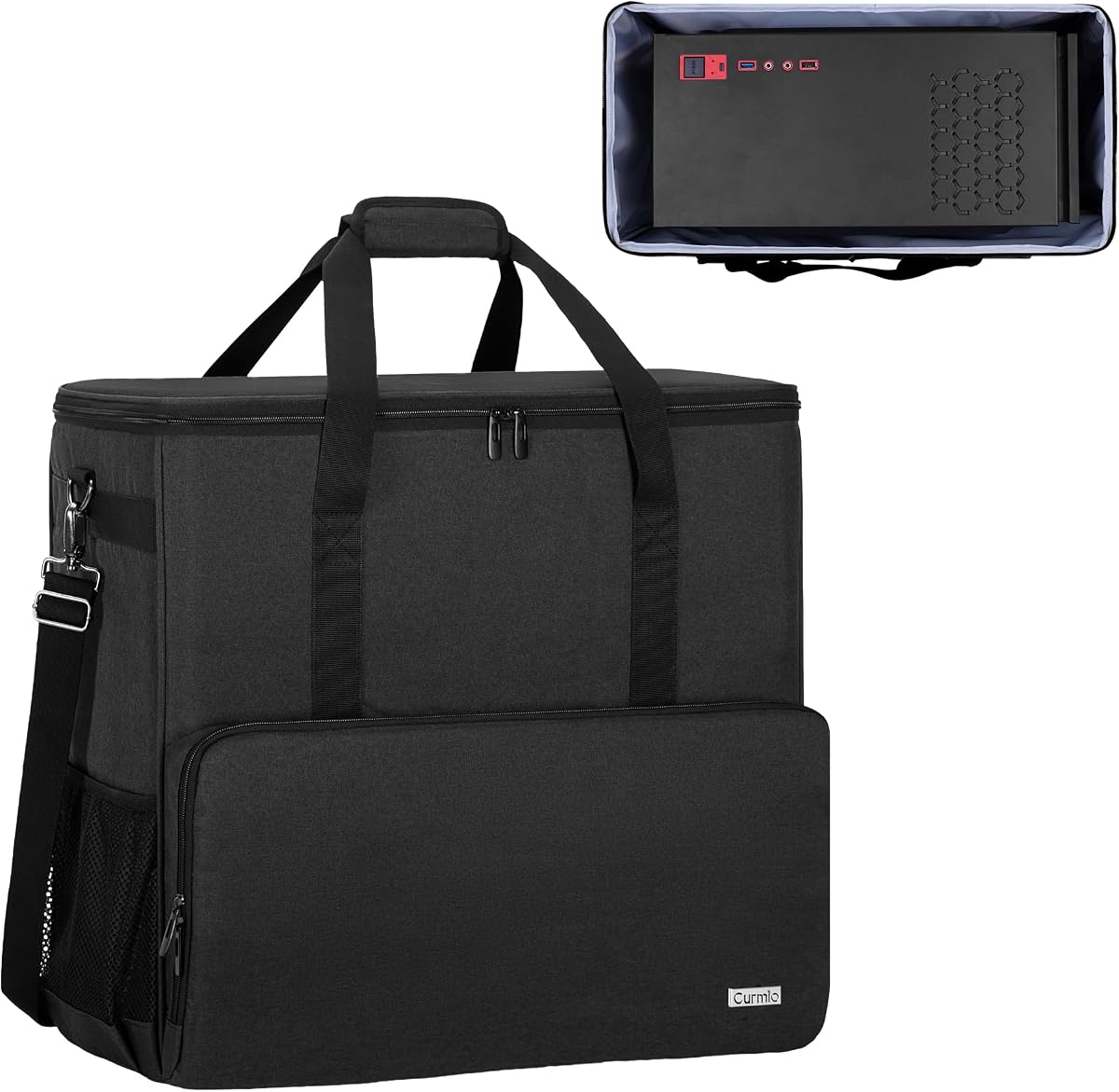
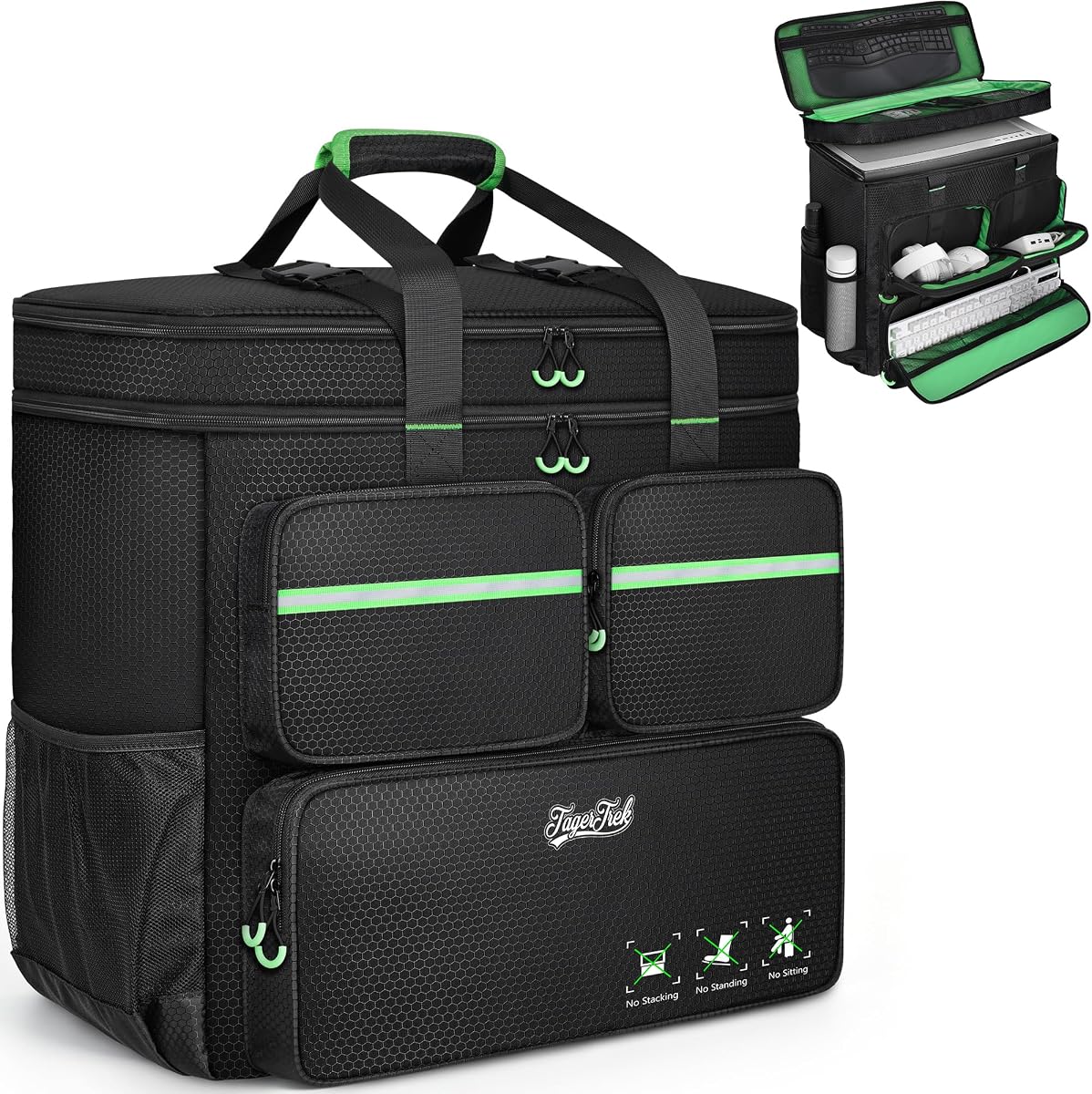
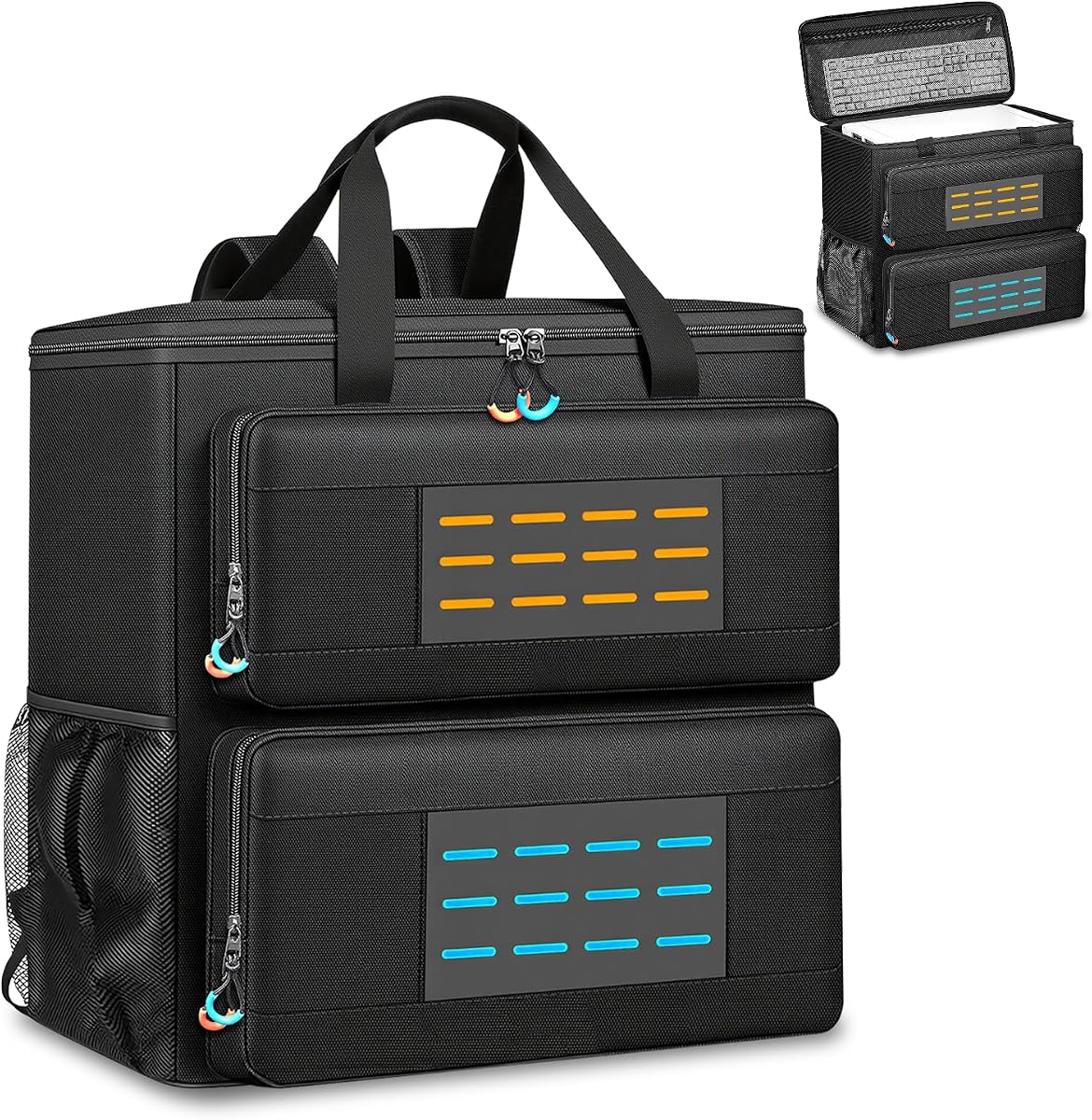


This large ATX mid-tower case offers a useful balance of protection, organization, and portability. Its 4.3 rating reflects a practical design aimed at standard desktop users who want to transport not only a computer tower but also many of the accessories needed to operate it. The stated external dimensions are 20.08 by 9.06 by 19.69 inches, while the maximum internal dimensions are 19.88 by 8.86 by 19.69 inches. That makes careful comparison with the tower's own measurements essential.
We may earn a commission when you buy through this link, at no additional cost to you.
Protection comes from thickened padding, a reinforced base, anti-slip feet, and a rear buckle fastener designed to prevent the load from tipping. The exterior uses Oxford fabric that resists rain and dust, while the lining helps limit dust accumulation during storage or transit. A full-height mesh panel adds useful internal organization and can hold small accessories without allowing them to press against delicate computer components.
The storage arrangement is one of the model's strongest points. Dedicated areas are provided for a keyboard, mouse, headset, and cables, while expandable side pockets increase flexibility. This organization turns the bag into more than a padded sleeve: it can function as a compact mobile workstation for a LAN event, office relocation, or a stay at another home. The padded handle and adjustable chest straps support comfortable movement when the bag is loaded.
The main trade-off is capacity. While the case fits most ATX mid-towers, it does not offer the extra clearance found in larger models, and buyers with a wide chassis, unusual side panels, or an oversized keyboard should measure both items carefully. Even so, it is a compelling option for value-conscious shoppers who want a dedicated tower case, substantial padding, and organized accessory storage without paying for a rolling system.
Thickened padding, a reinforced base, and anti-slip feet help shield the tower from impacts, scratches, and movement during ordinary travel. The rear buckle also reduces the chance that a heavy computer will tip when the bag is set down or lifted.
Separate storage for a keyboard, mouse, headset, and cables reduces the need for additional bags. Expandable pockets and a full-height mesh panel make this a practical all-in-one option for temporary setups, gaming events, and office moves.
We may earn a commission when you buy through this link, at no additional cost to you.
The Extra Large PC Travel Case is designed for buyers who prioritize capacity and protection over a compact footprint. It has a 4.6 rating and supports mainstream ATX and M-ATX motherboard form factors. The exterior measures 21 by 10.2 by 20.5 inches, while the internal space is listed as 20 by 10 by 20 inches. That additional room can accommodate a desktop tower and components such as a graphics card or radiator.
We may earn a commission when you buy through this link, at no additional cost to you.
Its protective construction combines high-density five-millimeter EPE lining with a wear-resistant 600D Oxford outer shell. The lining is intended to absorb impact and vibration, while the exterior helps guard against bumps, squeezes, and everyday wear during a move or long journey. The result is a more substantial protection system than a basic fabric sleeve, which is valuable when transporting a full-size desktop with a heavy graphics card.
Storage is unusually versatile. Three zippered front pockets include a large lower keyboard area, an elastic cable pocket, and a fleece-lined space for a mouse or power bank. Two side mesh pockets accommodate water bottles, and a zippered mesh compartment inside the top cover can hold another keyboard and mouse. This level of organization suits buyers who want the bag to function as a complete travel and relocation kit.
Its trade-offs are weight and bulk. An extra-large case naturally takes more space than a slim mid-tower carrier, and filled side pockets can affect how easily it sits on a table or fits in a vehicle. The soft padded handles and releasable chest buckle improve stability when worn on both shoulders. For a spacious, protective premium option, however, it offers one of the most complete feature combinations in this guide.
The internal dimensions leave room for more than a bare tower, allowing selected accessories such as a graphics card or radiator to travel with the computer. This reduces the number of separate cases required for a move or extended trip.
Five-millimeter EPE cushioning works with a durable Oxford exterior to protect against impacts and vibration. Dedicated keyboard, cable, mouse, and water-bottle spaces keep frequently used equipment accessible without overloading the main chamber.
We may earn a commission when you buy through this link, at no additional cost to you.
This rolling PC tower bag stands apart from conventional backpacks because it includes a detachable wheeled cart. It is built for buyers moving a desktop through airports, stations, hotels, event venues, or long corridors where keeping a heavy bag off the floor would be beneficial. Its 4.3 rating reflects a design that combines rolling convenience with standard backpack and hand-carry options.
We may earn a commission when you buy through this link, at no additional cost to you.
The computer compartment accommodates tower cases up to 21 by 18.5 by 11 inches. The product information specifically mentions compatibility with the LIAN LI O11D MINI V2 ATX, LIAN LI LANCOOL 207 ATX, Lian Li A3 M-ATX, and MONTECH XR-B ATX. Even so, buyers should not rely on case names alone and should compare their own chassis measurements against the stated limit.
The detachable cart folds flat, uses smooth silent swivel casters, and includes an aluminum pull handle with three height adjustments. For environments where wheels are inconvenient, the case also has a cushioned top handle and a backpack-style carrying method. Thick internal padding is intended to absorb shock and vibration, while the 600D polyester exterior is described as water-resistant and wear-resistant.
Organization is similarly comprehensive. The top includes a zippered pocket and mesh spaces for a keyboard and mouse, with a stated keyboard-length limit below 19.7 inches. Three front pockets hold a keyboard, cables, and a mouse or charger, while side mesh pockets fit water bottles. Bright green U-pull zippers make the openings easier to locate. The main compromise is added bulk and weight when the cart is attached, but for wheeled movement, this is among the most purpose-built options available.
The folding cart gives the case genuine transport flexibility. It can be pulled over smooth surfaces, detached for storage, or used with the included top handle and backpack straps when a rolling configuration is inconvenient.
The stated maximum size accommodates several named ATX and M-ATX models, but chassis shapes vary considerably. Measure the widest and tallest points, including protruding ports, feet, and side panels, before assuming the tower will fit.
We may earn a commission when you buy through this link, at no additional cost to you.
The CURMIO Full Tower Travel Bag is one of the strongest all-around choices in this roundup, combining a 4.7 rating with a mature collection of practical features. Its main compartment is specifically shaped for a desktop tower and measures 19.7 by 9.3 by 18.5 inches internally. The exterior is listed as 20.5 by 11 by 19.2 inches, so buyers with full-size systems should verify their measurements carefully.
We may earn a commission when you buy through this link, at no additional cost to you.
Protection is built around an interior foam-padded insert and a removable foldaway cushioned pad. Four bottom feet pads reduce friction with the ground when the bag is set down, helping protect the computer and accessories. The outer material is thick nylon described as water-resistant, scratch-resistant, and wear-resistant, making it suitable for repeated moves and regular travel.
The bag includes multiple pockets for common peripherals, including a keyboard, mouse, wires, hard drive, headphone, and radiator. A large opening makes it easier to place the tower inside and remove it again, an important consideration when the case is heavy. The adjustable, removable shoulder strap and reinforced padded handle provide two carrying options without requiring the bag to be worn as a conventional two-strap backpack.
The primary limitation is the carrying arrangement. A removable shoulder strap is flexible and useful for many trips, but it may not distribute a heavy tower as evenly across both shoulders as a two-strap backpack. Buyers should also confirm the 9.3-inch internal width against their chassis. For anyone who values refined padding, straightforward access, broad peripheral storage, and a well-established design, this remains an excellent recommendation.
The foldaway cushioned pad and interior foam insert create a protected main chamber, while the removable design can make loading easier. Four bottom feet help reduce direct contact with floors and other hard surfaces.
Dedicated space for a keyboard, mouse, cables, hard drive, headphones, and radiator means buyers can keep a functional desktop setup together. The large opening also reduces the awkwardness of inserting a heavy tower into a narrow sleeve.
We may earn a commission when you buy through this link, at no additional cost to you.
This large ATX travel case combines a 4.7 rating with a backpack-oriented approach that feels appropriate for carrying a heavy desktop. It supports ATX and M-ATX systems, with the computer space accommodating towers up to 21 by 18.5 by 11 inches. Named compatible examples include the LIAN LI O11D MINI V2 ATX, LIAN LI LANCOOL 207 ATX, Lian Li A3 M-ATX, and MONTECH XR-B ATX.
We may earn a commission when you buy through this link, at no additional cost to you.
The bag is made from water-resistant and wear-resistant polyester with reinforced stitching intended to withstand substantial loads. Thick internal padding helps absorb shock and vibration. A buckle at the top helps prevent the contents from shifting, while the integrated chest strap is designed to maintain balance and distribute weight more evenly across the shoulders during transport.
Storage is distributed across the top, front, and sides. The top has a zippered pocket and several mesh pockets for a keyboard and mouse, and the keyboard area supports models less than 19.7 inches long. Three front pockets provide space for a keyboard, cables, and a mouse or charger. Side mesh pockets can hold water bottles, helping prevent loose drink containers from pressing against the computer.
The main concern is footprint. At 21 by 21 by 11 inches, the case is deep and wide, making it less convenient than a compact mid-tower sleeve. It also needs enough clearance around a backpack wearer to be comfortable in crowded spaces. Nevertheless, for buyers who want two-strap backpack carrying, a stabilizing chest buckle, and substantial accessory organization, this is a highly capable and well-rated selection.
Two sturdy shoulder straps and an integrated chest buckle work together to keep the load stable. The top handle offers a faster alternative for shorter distances, while the buckle helps prevent the main compartment from shifting.
Top, front, and side storage keeps peripherals separated from the tower. A dedicated keyboard section, cable pocket, mouse or charger space, and mesh water-bottle pockets reduce loose-item clutter during a move or gaming trip.
We may earn a commission when you buy through this link, at no additional cost to you.
This padded computer tower backpack emphasizes protection through a combination of 8mm EPE foam and a rugged 600D Oxford exterior. It earns a 4.6 rating and is designed for desktop towers or servers that may encounter impacts, vibration, dust, scratches, and normal wear while being transported. The protective materials give it a more substantial feel than a basic zippered case.
We may earn a commission when you buy through this link, at no additional cost to you.
The main interior measures 19.7 by 10.6 by 18.5 inches, with an exterior size of 21.3 by 10.6 by 19.7 inches. It is stated to support ATX and Micro-ATX towers, and there is some room to store additional components alongside the chassis. As with any close-fitting desktop case, measuring the tower from several angles is more reliable than relying only on its nominal form factor.
Storage is arranged around a full travel setup. A front sleeve accepts a keyboard, while lined compartments keep a mouse and cables separate. Side mesh pockets hold water bottles, and internal mesh storage offers another place for smaller accessories. The thick lining and tear-resistant shell help keep frequently used equipment organized and protected instead of allowing it to press against the tower.
For transport, adjustable padded shoulder straps and a stabilizing chest strap distribute the load across the back and shoulders. The design is particularly appealing for buyers who want one consolidated bag rather than a tower case and a separate accessory bag. The limitations are its wide profile and the additional bulk created by bottle pockets and large front sections. Still, it is a well-balanced option for buyers who put high value on cushioning and durability.
The eight-millimeter EPE interior is designed to absorb shocks and vibrations during transport. Combined with a rugged Oxford shell, it offers meaningful protection for desktop computers, servers, and other valuable electronic equipment.
A front keyboard sleeve, lined mouse and cable compartments, side mesh spaces, and internal mesh storage allow the bag to function as a complete travel kit. Adjustable straps and a chest buckle improve comfort and balance.
We may earn a commission when you buy through this link, at no additional cost to you.
The Trunab ATX Desktop Travel Backpack is a compact carrier focused on cushioning and secure handling. Its 4.6 rating reflects a design that works particularly well for standard ATX and M-ATX mainframe chassis. The internal dimensions are listed as 20.1 by 8.66 by 18.5 inches, while the exterior measures 20.5 by 10.1 by 18.7 inches.
We may earn a commission when you buy through this link, at no additional cost to you.
Protection comes from internal foam padding and thickened pearl-cotton cushions that surround the computer host. Four no-slip bottom feet reduce friction when the case is placed on the ground. The outer material is described as tear-resistant and water-resistant, with padded lining that helps protect against dust, scratches, and moisture during transport or storage.
The accessory layout includes spaces for a keyboard, earphones, computer radiators, and hard drives. Side pockets with buckles help keep smaller belongings from being lost. These details make the bag relevant beyond a simple tower sleeve, particularly for buyers who regularly travel with a cooling system, drives, or other components that would otherwise need separate protection.
The bag can be carried with an adjustable ergonomic padded shoulder strap or a top padded handle. A buckle chest strap helps prevent the shoulder strap from slipping off, which is a useful detail when the bag contains a heavy and irregularly shaped computer. The trade-off is that it is primarily a single-strap backpack rather than a balanced two-strap model, and its 8.66-inch internal width is relatively narrow. It is best for carefully measured standard towers rather than oversized chassis.
Foam padding and pearl-cotton cushions create a soft protective layer around the tower. The non-slip feet add stability when the case is set down, reducing direct contact between the bag and hard surfaces.
Storage for radiators, hard drives, headphones, and a keyboard is more practical than a tower-only sleeve. Buckled side pockets add security for smaller items that might otherwise be lost in transit.
We may earn a commission when you buy through this link, at no additional cost to you.
The Large Desktop Tower Travel Case stands out for its wide 21.26 by 12.6 by 18.89-inch exterior, giving it more horizontal room than most conventional tower bags. It has a 4.3 rating and is intended for ATX and M-ATX systems, with space beyond the basic tower for selected components such as a graphics card or radiator. The broad body may be especially useful for cases with wider side panels or additional external hardware.
We may earn a commission when you buy through this link, at no additional cost to you.
Its construction combines a high-density five-millimeter EPE lining with a wear-resistant, thickened 600D Oxford exterior. The internal cushioning is intended to absorb impact and vibration, while the outer layer helps resist bumps, squeezes, and everyday wear. This is a serious transport design for buyers who view the computer as a valuable, fragile system rather than something suitable for an unprotected fabric sleeve.
The front contains three zippered pockets. A lower section can hold a keyboard, a top-left area uses elastic straps to secure cables, and a fleece-lined right pocket accommodates a mouse or power bank. Two side mesh pockets provide water-bottle storage, and a zippered mesh pocket inside the top cover can contain a keyboard and mouse. The range of storage is broad, although the top mesh area should not be expected to restrain very small loose components.
Portability is the main compromise. At 12.6 inches wide, the case is substantially broader than standard mid-tower sleeves and may be less convenient on public transport or in narrow vehicle spaces. The padded handle and two-strap configuration, supplemented by a releasable chest buckle, help make the larger load manageable. It is a strong option for users who value extra clearance and many pockets more than the smallest possible carrying profile.
The wider body provides more room around the tower than a close-fitting mid-tower case. It can also accommodate selected loose components, making it practical for buyers who want to consolidate a larger portion of a desktop setup.
Thickened EPE lining cushions the computer against shocks and vibration, while the Oxford exterior adds a durable barrier. The combination is well suited to moves, business travel, and trips to gaming events.
We may earn a commission when you buy through this link, at no additional cost to you.
The CURMIO Double-Layer Tower Case combines a 4.7 rating with a storage layout designed to hold both a computer and a substantial collection of accessories. Its internal main compartment measures 19.7 by 9.3 by 18.5 inches, while the exterior is listed as 20.5 by 11 by 20.5 inches. The extra height differentiates it from the closely related single-layer design in this roundup.
We may earn a commission when you buy through this link, at no additional cost to you.
The double-layer construction provides multiple pockets for a keyboard, mouse, wires, hard drive, radiator, and headphones. This makes the bag particularly useful when the destination has a complete desktop setup waiting but only minimal space for loose gear. Protection comes from the interior foam-padded insert, a removable foldaway cushioned pad, and four bottom feet that reduce friction with the ground.
A large main opening makes the heavy tower easier to place inside and remove. The bag also offers a reinforced padded handle and an adjustable, removable shoulder strap. Its thick nylon exterior is described as wear-resistant and water-resistant, supporting use for relocations, extended travel, and storage between uses. The removable cushioning also gives owners some flexibility in how tightly the main compartment is packed.
Its trade-offs are similar to those of other full-size desktop carriers. The 20.5-inch exterior height makes it bulkier than a compact case, and a removable shoulder strap may not offer the same balanced feel as two padded backpack straps. The four feet also add a small amount to the overall profile. Even with those considerations, the 4.7 rating, layered storage, and protective construction make this a compelling option for organized travel.
The double-layer system separates a computer from its most common peripherals. Dedicated areas for a keyboard, mouse, cables, hard drive, radiator, and headphones reduce the need for separate organizers during a move.
The removable foldaway cushion and foam insert help protect the tower, while bottom feet reduce direct friction against the floor. A wide opening makes it straightforward to inspect the computer and accessories before and after travel.
We may earn a commission when you buy through this link, at no additional cost to you.
This ATX Desktop Tower Large Carrying Case has the highest listed rating in the roundup at 4.9, making it an immediate candidate for shoppers who prioritize proven customer reception. It is designed for standard ATX and mid-tower cases, along with compatible M-ATX systems. Its external dimensions are approximately 20.4 by 10.2 by 18.9 inches, and the main internal compartment is approximately 20.4 by 19 by 18.5 inches.
We may earn a commission when you buy through this link, at no additional cost to you.
Protection comes from high-density foam padding and thickened cushioning that absorb impacts and vibration. The nylon exterior is described as scratch-resistant and tear-resistant, while the smooth-running zipper allows the main compartment to be opened without awkward resistance. These characteristics make it suitable for house moves, LAN parties, plane travel, and gaming tournaments where a computer needs more protection than a simple sleeve.
The storage system is particularly versatile. A zipped mesh pocket in the lid can hold a keyboard, while the front compartment accommodates a mouse, cables, hard drives, coolers, and headphones. Two side pockets with press studs provide additional space for valuables. External MOLLE webbing can also accept extra equipment, creating a flexible way to organize items beyond the bag's built-in compartments.
Carrying options are excellent. The padded adjustable shoulder straps create a balanced rucksack configuration, the top handle supports quick lifting, and a rear luggage strap secures the bag to a wheeled suitcase. A buckled chest strap improves stability and reduces localized shoulder pressure. One minor consideration is that MOLLE attachments can create visual clutter or catch on nearby objects. With its 4.9 rating and broad feature set, however, it is an especially attractive recommendation for flexible travel and moving.
The bag can be worn as a balanced rucksack, lifted by its padded top handle, or secured to a rolling suitcase with the rear luggage strap. This flexibility is useful when switching between terminals, vehicles, hotels, and event spaces.
Lid mesh storage, a front accessory area, side pockets, and external MOLLE webbing create several levels of organization. The design can handle standard peripherals while also giving buyers a way to attach or position additional equipment.
We may earn a commission when you buy through this link, at no additional cost to you.
The right desktop tower carrying case depends on chassis fit, protection, storage, and the way you intend to move. Measure first, compare internal dimensions carefully, and choose a carrying method that suits the weight and distance of your trips.
Internal dimensions matter more than the form factor printed on a product listing. ATX and M-ATX describe motherboard standards, but chassis manufacturers add side panels, feet, ports, handles, and other protrusions that can change the usable envelope. Measure the tower's length, width, and height, including any parts that protrude, and compare those figures with the case's internal limits. Pay particular attention to width because many desktop cases are designed around a narrow 8.66- to 9.3-inch internal span, while wider bags may offer substantially more room.
Measure the accessories too, especially a full-size keyboard. Some cases use the bag's height or width for keyboard storage, and some explicitly limit compatible keyboard length. A computer can fit while the rest of the setup does not, so treat the accessory dimensions as part of the purchase decision.
A useful carrying case needs both internal cushioning and a durable exterior. Dense EPE foam, pearl cotton, and high-density foam can help absorb shocks and vibration, while Oxford cloth, nylon, and polyester add resistance to abrasion, dust, and light moisture. The shell alone does not determine protection, so consider whether the padding wraps around the tower, whether it is removable, and whether the bag's structure prevents the computer from pressing against hard fittings.
Prioritize padding when a tower includes a heavy graphics card, when luggage will be handled roughly, or when the case will be checked as baggage. For occasional local relocations, a durable exterior and removable cushion may be sufficient.
Desktop towers are heavy and awkward, so the carrying method can matter as much as the material. Two shoulder straps and a chest buckle generally distribute weight more evenly than a single strap. A padded top handle is useful for lifting but may become tiring over long distances. A wheeled cart is valuable for airports, hotels, and event venues, provided the route has smooth surfaces. A rear luggage strap is also useful because it allows the computer bag to ride on top of a rolling suitcase.
Consider who will carry the case, how far the trip involves, and whether stairs or uneven pavement are likely. The most elaborate transport system is not always the most convenient one.
The best cases for travel can hold a keyboard, mouse, cables, headphones, and other essential equipment without mixing those items with the tower. Dedicated front pockets, elastic cable straps, fleece-lined mouse spaces, mesh compartments, side bottle pockets, and internal lid storage are common solutions. Look for separation between heavy components such as radiators or graphics cards and softer peripherals that could be damaged by pressure.
Buyers with a large desktop setup should inventory everything that must travel and compare pocket dimensions before ordering. Extra storage is helpful, but poorly sized compartments can leave a full-size keyboard hanging outside the case.
A computer bag should remain upright and should not allow the tower to shift when set down. Reinforced bases, anti-slip feet, internal securing straps, and top buckles all contribute to stability. These features are especially valuable with full-size ATX towers because their weight can make a soft-sided bag lean or collapse.
A wide footprint may improve stability but reduce portability. A rear luggage strap can also prevent the case from sliding while it is attached to another bag. Use every available fastening point when carrying a fully loaded system.
Extra-large cases provide more room for wide chassis, accessories, and protective structures, but they are heavier and harder to fit into vehicles or storage areas. Standard mid-tower bags are easier to manage on stairs and public transportation. Their narrower dimensions can make them uncomfortable to wear as a backpack, however, because the tower tends to rest against the back.
Weigh the value of additional capacity against how often the case will be moved. A compact, well-padded design is often better for regular travel, while a broad extra-large model is more appropriate for occasional moves, unusual systems, or transporting substantial extra equipment.
Oxford, nylon, and polyester outer fabrics are commonly treated for water resistance and wear resistance, making them suitable for commutes and outdoor transfers. No travel case should be assumed to be waterproof, so exposed luggage and prolonged rain require caution. Sealed or covered zippers and separate placement of wet bottles are useful precautions.
Water resistance should complement rather than replace internal cushioning. The best design protects the computer from impact, vibration, scratches, dust, and weather exposure at the same time.
Product dimensions, ratings, features, and prices can change over time, and different sellers may offer the same bag under different conditions. Check the current listing for the exact model, dimensions, included accessories, and warranty details. Confirm that the bag is for a desktop tower rather than a laptop, mini PC, monitor, or server chassis with a different footprint.
If traveling by air, check the carrier's current baggage rules separately. A bag that fits a desktop tower may still need to be treated as checked luggage or checked as oversized baggage.
Before packing, power down the computer completely, allow it to cool, and disconnect every cable. A powered-off system reduces the risk of accidental activation or component damage. If the case includes a removable pad, position it around the tower as directed, close the main compartment fully, and use every top buckle or internal strap to keep the chassis from shifting.
Pack the keyboard and mouse in their designated areas, coil cables neatly, and avoid placing rigid accessories against the computer's glass side panel or top surface. Use the bottle pockets only for tightly closed containers, and make sure the outer MOLLE webbing or side pockets do not snag on door handles, seats, or other objects. When attaching the case to rolling luggage, secure the luggage strap fully and keep the tower's weight low and close to the suitcase.
Inspect the case after each trip for loose stitching, damaged zippers, compressed foam, or buckles that no longer hold. Brush away dust gently and spot-clean the outer fabric with a lightly damp cloth rather than saturating the padding. Let the bag dry completely before storing it, and keep the tower compartment empty and open when possible so trapped moisture and odors can dissipate.
Choose a case whose internal dimensions are slightly larger than the tower's length, width, and height. Measure every protruding part, including side panels, feet, handles, and ports, rather than relying only on whether the motherboard is ATX or M-ATX. A case can support the correct form factor and still fail to fit a particular chassis.
Most of the featured cases include dedicated keyboard, mouse, cable, or accessory storage. However, the available space and keyboard length limit vary between models. Confirm the dimensions of a full-size mechanical keyboard and the stated pocket allowance before ordering, particularly if the keyboard is thick, angled, or includes a wrist rest.
The featured cases use water-resistant or wear-resistant Oxford, nylon, and polyester materials, but they should not automatically be treated as waterproof. Rain, spills, and wet luggage can still reach the openings and seams. Keeping bottles sealed, covering the bag during poor weather, and checking the fabric before travel are sensible precautions.
A rolling case is usually easier over smooth floors and can reduce strain on the shoulders during long walks. A backpack is more flexible on stairs, crowded areas, and rough surfaces. The rolling model reviewed here also retains a top handle and wearable straps, giving buyers both options, but it adds bulk and some extra weight.
Several cases state that the extra room can accommodate selected graphics cards or radiators. Fit depends on the precise dimensions and shape of those parts, and the manufacturer may intend the space for occasional storage rather than regular transport. Use a protective sleeve and avoid placing a heavy component where it can press against the tower.
Use two padded shoulder straps and fasten the chest buckle when the design provides them, keeping the load close to your back. Lift with the top handle only for short distances or when placing the bag on a surface. For wheeled travel, use the cart or attach the case securely to rolling luggage, and avoid abrupt movement.
That depends on the case, your itinerary, and the stability of the components. The featured bags are designed to hold desktop towers and selected accessories, but delicate or heavy parts should not be placed where they can move, press against sensitive panels, or stress their connectors. Check the manufacturer's guidance and the airline's baggage rules before traveling.
Vacuum loose dust with a soft brush, then spot-clean the outer fabric with a lightly damp cloth. Avoid soaking the shell, machine washing dense padding, or using harsh cleaners that could damage the lining and foam. Let the case dry fully in an open, ventilated area before closing or storing it.
The best value option is the ATX Mid-Tower Large Carrying Case because it combines dense protection, a reinforced base, dedicated accessory compartments, and a practical backpack-style carry system. The ATX Desktop Tower Large Carrying Case is the strongest all-around choice, combining the highest listed rating with extensive storage, several carrying methods, and a rear luggage strap. For buyers wanting more space and especially substantial cushioning, the Extra Large PC Travel Case offers five-millimeter EPE protection and a roomy main compartment.
Prioritize exact internal fit before any other feature, followed by protection and the carrying method that matches your trip. A two-strap model works well for regular transport, a rolling cart is useful across smooth airports and event venues, and extra-large construction is valuable for wide chassis or loose components. Dedicated accessory storage can also eliminate the need for several smaller bags.
Ratings, dimensions, features, and prices may change as listings evolve, so verify the current product page before buying. Confirm the case's internal measurements, review supported chassis examples, check keyboard storage limits, and compare the carrying setup with your route. With those checks completed, one of these ten cases can provide a safer and considerably more convenient way to transport a desktop tower.